By Eric Andrew Kristof, RN, CAHIMS | Healthcare IT Professional | HIMSS Arkansas Chapter Member
About This Series: The HIMSS Word of The Day is a running blog series drawing from the HIMSS Dictionary of Health Information and Technology Terms, Acronyms, and Organizations, 6th Edition (2025) — the authoritative reference for healthcare IT professionals and the primary study resource for CAHIMS and CPHIMS certification. Each post paraphrases the term in plain language, grounds it in real-world healthcare IT context, and adds a bedside nursing perspective you won’t find in a textbook.
📖 The Term: Session Management
Source: HIMSS Dictionary of Health Information and Technology Terms, Acronyms, and Organizations, 6th Edition (2025)
🔍 Plain-Language Definition
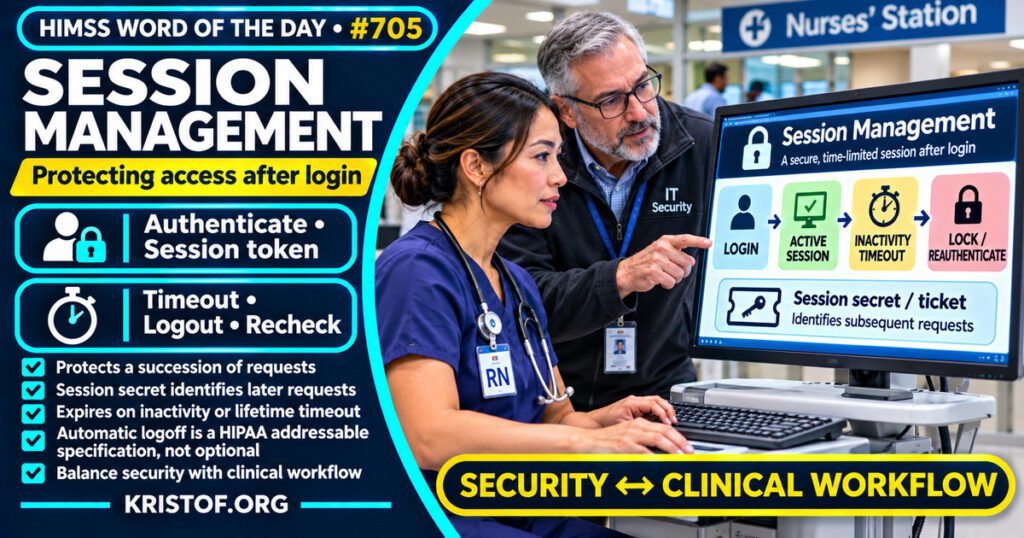
The HIMSS Dictionary defines session management as the way a service protects a series of requests that all originate with one user or one system. The series usually begins when that user proves identity, for example with a password, and the service then calls it a session. After that point, the service checks the session on each later request instead of checking the person again.
In plain terms, a login happens once and a session carries the result forward. If the session is easy to hijack, never expires, or is left open on a shared workstation, a strong login adds less protection than it seems to.
| Concept | Meaning |
|---|---|
| Authentication | Proving identity at the start, such as with a password or badge |
| Session | The period after authentication during which later requests are accepted |
| Session secret | A value the user’s software presents to show the session is the same one (NIST‘s term) |
| Timeout | A limit on total session length or on inactivity |
| Logout | The user ending the session on purpose |
| Automatic logoff | A HIPAA Security Rule specification for ending a session after inactivity |
⚠️ Exam Alert: Authentication proves who the user is at one moment, while session management keeps that proof valid across later requests. Single sign-on lets one login cover several applications. Access control decides what an authenticated user may do. Automatic logoff is one session control, and HIPAA lists it as addressable, which does not mean optional.
🌐 Why It Matters: Real-World Healthcare IT Context
Session management is technical and the health care evidence on it is thin, so this section draws on NIST guidance, the HIPAA Security Rule text, and three studies of clinician login workflows. None of those studies tested session security directly.
What NIST says. NIST’s current digital identity guidelines (SP 800-63-4) describe a session as beginning after an authentication event and ending through logout, an inactivity timeout, or an overall timeout, with reauthentication able to extend it. A session secret ties the user’s software to the service. NIST says it must come from an approved random generator, be at least 64 bits long, travel over a protected channel, and be erased or invalidated at logout. It says the secret should not be kept in insecure places such as HTML5 local storage. For browser cookies it says they must use the Secure flag and should be hidden from scripts with HttpOnly and carry only an opaque identifier. When either timeout expires the session must end, and the service may warn the user first. The page also says that in federated designs the identity provider and the application manage their sessions independently, so ending one does not end the other. Whether a given hospital single sign-on product works that way depends on its design. The page refers to agencies, so it appears aimed at federal systems and serves here as a technical reference, not a hospital requirement.
What HIPAA says. The Security Rule’s technical safeguards (45 CFR 164.312(a)(2)) list four implementation specifications for access control. Unique user identification and an emergency access procedure are required. Automatic logoff and encryption and decryption are addressable. Automatic logoff calls for electronic procedures that end a session after a predetermined period of inactivity. The text I read names no number of minutes. Addressable does not mean optional, and the rule text itself is the place to confirm how organizations must document their decision.
What studies of logins show. Fontaine et al. (2016) surveyed staff before and after proximity card readers were added to an inpatient birthing center and an outpatient obstetrics clinic that already had single sign-on. There were 71 responses before and 33 after. Perceived login speed rose significantly and self-reported shared login sessions fell significantly, though the benefit was minimal with an obstetric application that did not support single sign-on. This is one health system and perception data. Gellert et al. (2020) compared login times before and after single sign-on at 19 hospitals. First-of-shift login fell by 5.3 seconds (15.3%) and reconnect time fell by 20.4 seconds (69.9%). The authors estimated 27,962.4 nursing hours freed per year across the 19 facilities and attached dollar values to that time, which are estimates. Baysari et al. (2026) interviewed 17 doctors and nurses and observed about 7 hours of work in one Australian emergency department using a tap-on, tap-off system with virtual desktops. Most participants questioned its value for emergency work, login time was relatively long for that setting, and workarounds led to users being logged out mid-task. Taken together, these studies suggest that session and login friction can push clinicians toward workarounds. That reading is my inference, and none of the studies measured breaches.
What I could not confirm. I found no PubMed study that evaluates automatic logoff or timeout settings directly, so I cannot say what inactivity limit works best in clinical settings. NIST sets limits by assurance level on other pages that I did not read in a form I could verify, so I left the numbers out. I read the HIPAA wording in the Legal Information Institute’s copy of the regulation and not on eCFR, so the official text should be checked. I read abstracts for the three studies, did not review full texts, and did not check author funding or affiliations.
Common session management problems:
- Treating login and session handling as the same control
- Timeouts so short that clinicians work around them
- Timeouts so long that an unattended workstation stays open
- Shared login sessions kept open to save time
- Session secrets sent or stored insecurely
What supports session management:
- Random session secrets sent over protected channels, per NIST
- Overall and inactivity timeouts that end sessions
- An easy logout that invalidates the session secret
- Automatic logoff addressed under HIPAA’s access control safeguards
- Faster re-entry such as single sign-on, where studies report time savings
🏥 The Nurse’s Perspective: Clinical, Bedside, & Workflow
One reviewed study measured nurse login time and none measured whether session controls prevent breaches, so the points below are workflow context and not findings.
At the Bedside
A nurse may move between several rooms and workstations in a shift, and every timeout or lock means signing in again. Gellert and colleagues reported reconnect time falling by 20.4 seconds after single sign-on, a small gain that repeats many times a day. Fontaine and colleagues describe staff sharing login sessions to save time, which can leave actions recorded under another person’s name.
In Clinical Workflow
Nurse informaticists often sit between security staff who want short timeouts and clinicians who need continuous access during a task. The emergency department study shows a possible result of getting the balance wrong: workarounds and being logged out mid-task. A timeout that interrupts a medication scan or a note in progress costs more than the seconds it takes to sign back in.
In EHR Implementation (Go-Live Perspective)
During an Epic Go-Live, analysts and at-the-elbow support staff hear “it logged me out” often. Separating a normal timeout from a real system error is a common triage step, and badge tap or single sign-on flows usually need coaching in the first days on a unit. This is context from workflow experience, and the sources reviewed do not examine go-lives.
🎓 CAHIMS / CPHIMS & HIMSS Perspective
CAHIMS Exam Domain Mapping
Session management sits where security safeguards meet clinical workflow:
| CAHIMS Domain | How Session Management Appears |
|---|---|
| Healthcare & Technology Environments | Security safeguards and the HIPAA Security Rule’s access controls |
| Clinical Informatics | How login and logoff workflows affect documentation and care |
| Healthcare Information & Systems Management | Configuring timeouts, single sign-on, and logoff policies |
| Management & Leadership | Balancing security risk against clinician workflow in policy |
Key Terms to Know Alongside Session Management
- Authentication — proving identity at the start of a session
- Single Sign-On — one login that covers several applications
- Access Control — rules that decide what an authenticated user may do
- HIPAA Security Rule — the federal rule that lists automatic logoff among its technical safeguards
- Audit Trail — a record of who did what, which depends on sessions being tied to the right person
- TLS — the protocol that provides the protected channel NIST expects session secrets to travel over
HIMSS Organizational Position
HIMSS offers education and research on health information and technology topics through its Resource Center. Members can find related information on the HIMSS Resource Center page.
🧭 More HIMSS Word of The Day Terms
Related terms in the Cybersecurity and Privacy series:
- ePHI (Electronic Protected Health Information)
- Kerberos
- AAA (Authentication, Authorization, and Accounting)
- Identity and Access Management (IAM)
Browse all Cybersecurity and Privacy terms or the A–Z glossary.
🔗 Explore Further: External References
- NIST — Digital Identity Guidelines, SP 800-63B, Session Management section (part of SP 800-63-4, July 2025) https://pages.nist.gov/800-63-4/sp800-63b/session/
- Legal Information Institute — 45 CFR 164.312, Technical Safeguards https://www.law.cornell.edu/cfr/text/45/164.312
- Fontaine et al. (2016), International Journal of Medical Informatics — Evaluation of a proximity card authentication system for health care settings. https://pubmed.ncbi.nlm.nih.gov/27318066/
- Gellert et al. (2020), The Journal of Nursing Administration — Electronic Health Record Workstation Single Sign-on: A Quantification of Time Liberated for Nurses to Care for Patients. https://pubmed.ncbi.nlm.nih.gov/32826515/
- Baysari et al. (2026), BMC Medical Informatics and Decision Making — Understanding how a tap on/tap off system supports clinical work in an emergency department: a qualitative study. https://pubmed.ncbi.nlm.nih.gov/41794736/
- HIMSS — Resource Center https://www.himss.org/resource-center
Term source: HIMSS Dictionary of Health Information and Technology Terms, Acronyms, and Organizations, 6th Edition (2025). All definitions in this series are paraphrased for editorial purposes. Readers are encouraged to consult the primary source for exact language.
Eric Andrew Kristof, RN, CAHIMS is a Healthcare IT professional and HIMSS Arkansas Chapter member based in Hot Springs Village, AR, with hands-on Epic Go-Live experience and a diverse healthcare and IT background. He writes at kristof.org at the intersection of clinical care and healthcare technology.
Leave a Reply