By Eric Andrew Kristof, RN, CAHIMS | Healthcare IT Professional | HIMSS Arkansas Chapter Member
About This Series: The HIMSS Word of The Day is a running blog series drawing from the HIMSS Dictionary of Health Information and Technology Terms, Acronyms, and Organizations, 6th Edition (2025) — the authoritative reference for healthcare IT professionals and the primary study resource for CAHIMS and CPHIMS certification. Each post paraphrases the term in plain language, grounds it in real-world healthcare IT context, and adds a bedside nursing perspective you won’t find in a textbook.
📖 The Term: AD (Active Directory)
Source: HIMSS Dictionary of Health Information and Technology Terms, Acronyms, and Organizations, 6th Edition (2025)
🔍 Plain-Language Definition
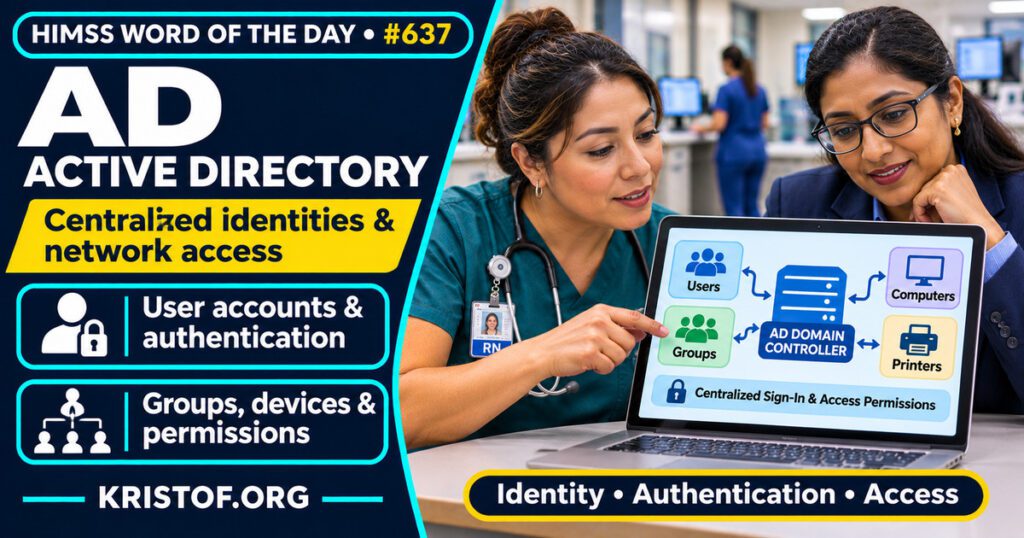
The HIMSS Dictionary describes Active Directory (AD) as a system that automates how a network handles user information, security, and shared resources. In practice, Active Directory is Microsoft’s directory service. Microsoft’s documentation describes Active Directory Domain Services (AD DS) as a directory service that stores information about objects on a network and makes that information available to users and administrators.
A directory in this sense is a structured store of facts about network objects. The Microsoft page lists examples such as servers, volumes, printers, and the user and computer accounts on the network. Two jobs follow from that. Authentication checks who is signing in, and the page says a single network username and password can give a user access to resources across the network. Authorization uses access control on directory objects to decide what that user may do.
| Component | What it does, per Microsoft’s overview |
|---|---|
| Directory | Holds information about network objects such as user accounts, computers, servers, and printers |
| Schema | A set of rules that defines the object classes and attributes in the directory |
| Domain controller | A server that holds a complete copy of directory information for its domain and takes part in replication |
| Global catalog | Holds information about every object so users can find data in any domain |
| Authentication and access control | Sign-in verification and permissions on directory objects |
The table is a simplified summary of one Microsoft Learn page. A practical way to think about it: the directory is a shared record of who and what exists on the network, and many other systems consult that record when they decide whether to let someone in. Because several systems may lean on the same record, a change made once in the directory can show up in many places, which is convenient for administrators and also the reason the directory deserves careful protection.
⚠️ Exam Alert: Active Directory is a directory product and service. Single sign-on is a user experience in which one sign-in opens several systems. Identity and access management is the wider discipline, and role-based access control is one model for assigning permissions. Microsoft also offers a cloud directory, Microsoft Entra ID, which is a separate product, so exam and project questions should be read to see which one is meant.
🌐 Why It Matters: Real-World Healthcare IT Context
Active Directory matters in healthcare because sign-in, workstation settings, and access to shared resources in many organizations depend on one directory. When it works, most people never think about it. When it fails or is compromised, the effect can reach many systems at once.
What government guidance says. CISA, the National Security Agency, and partners in Australia, Canada, New Zealand, and the United Kingdom publish joint guidance titled Detecting and Mitigating Active Directory Compromises. CISA’s page says the guidance covers 17 common techniques that adversaries use against Active Directory, with mitigation strategies for each. A CISA bulletin dated September 15, 2026 says the guidance was updated, and lists themes such as understanding and baselining Active Directory, detecting common credential theft and authentication compromises, hardening configuration to prevent privilege escalation and persistence, identifying indicators of full domain compromise, and strengthening monitoring and logging. The Canadian Cyber Centre’s page for the guidance, modified September 15, 2026, lists 18 named techniques, including Kerberoasting, password spray, DCSync, golden ticket, and skeleton key. The count differs from CISA’s page, so the guidance has probably grown, but I could not confirm that. I could not open the Australian copy of the updated guide because the site disallows automated access, so I did not use it.
What HIPAA says. The HHS HIPAA Security Rule page lists Access Control and Authentication under Technical Safeguards. It says covered entities must implement technical policies and procedures so that only authorized persons can reach ePHI, and procedures to verify that a person seeking access is who they say they are. The page does not name a product, so Active Directory is one common way to meet those expectations and not a rule.
What studies show. I did not find peer-reviewed studies of Active Directory in healthcare. A PubMed search returned no relevant results, so this section is based on guidance documents and vendor documentation, not on research. Guidance documents show what authorities recommend, but they do not measure how often attacks succeed in hospitals.
What I could not find. I did not find healthcare-specific statistics on Active Directory compromises, and I did not verify which healthcare organizations use Active Directory. Microsoft’s page also links to older articles written for earlier Windows Server versions, so details should be checked against current documentation.
Common Active Directory problems:
- Old or unneeded accounts left active
- Administrator rights granted more widely than needed
- Weak passwords exposed to techniques such as password spraying
- Little monitoring or logging of directory activity
- Configuration left unchanged for years, with settings no one reviews
- No clear picture of normal activity to compare against
What supports stronger Active Directory security:
- Baselining the directory so unusual changes stand out
- Detecting credential theft and unusual authentication activity
- Hardening configuration to limit privilege escalation
- Monitoring and logging, with someone assigned to review them
- Limiting administrator accounts and reviewing access regularly
- Regular review of the current joint guidance as it is updated
🏥 The Nurse’s Perspective: Clinical, Bedside, & Workflow
Nurses rarely see Active Directory by name, but they depend on it whenever a sign-in works or does not.
At the Bedside
A network sign-in often unlocks the workstation, shared drives, and other tools. When an account is locked, a password expires at a bad moment, or a workstation cannot reach the directory, the effect is immediate: a nurse cannot get to the chart. Whether a specific EHR sign-in depends on the directory depends on the local design.
In Clinical Workflow
Unit managers and informaticists work with account requests, role changes, and access reviews. When staff change units or leave, accounts and permissions need to change with them. A clear request process makes those changes faster and safer.
In EHR Implementation (Go-Live Perspective)
During an Epic Go-Live, “I cannot log in” is one of the first questions at-the-elbow analysts hear, and the cause may be a new account, a missing role, a locked password, or something else. This post does not claim that any specific go-live had a directory problem. It shows why account creation, role mapping, and sign-in testing belong in readiness work.
🎓 CAHIMS / CPHIMS & HIMSS Perspective
CAHIMS Exam Domain Mapping
Active Directory connects infrastructure, security, and clinical access:
| CAHIMS Domain | How Active Directory Appears |
|---|---|
| Healthcare & Technology Environments | HIPAA technical safeguards and the identity layer of a health system |
| Clinical Informatics | Role-based access to clinical applications and data |
| Healthcare Information & Systems Management | Directory administration, account lifecycle, monitoring, and hardening |
| Management & Leadership | Access governance, security risk management, and incident response |
Key Terms to Know Alongside Active Directory
- Single sign-on — one sign-in that gives access to several systems
- Role-based access control — permissions assigned according to job role
- Kerberos — a network authentication protocol used in many directory environments
- Identity and Access Management — the practices and tools that manage who can use what
- Authentication, Authorization, and Accounting — verifying identity, granting permissions, and recording activity
- Domain controller — a server that holds directory information for its domain
HIMSS Organizational Position
HIMSS offers education and research on health information and technology topics through its Resource Center. Members can find related information on the HIMSS Resource Center page.
🧭 More HIMSS Word of The Day Terms
Related terms in the Cybersecurity and Privacy series:
Browse all Cybersecurity and Privacy terms or the A–Z glossary.
🔗 Explore Further: External References
- CISA — Detecting and Mitigating Active Directory Compromises https://cisa.gov/resources-tools/resources/detecting-and-mitigating-active-directory-compromises
- CISA — Update Bulletin: Guidance on Detecting and Mitigating Active Directory Compromises (September 15, 2026) https://content.govdelivery.com/accounts/USDHSCISA/bulletins/42acb6e
- Canadian Centre for Cyber Security — Joint guidance on detecting and mitigating Active Directory compromises https://cyber.gc.ca/en/news-events/joint-guidance-detecting-and-mitigating-active-directory-compromises
- Microsoft Learn — Active Directory Domain Services overview https://learn.microsoft.com/en-us/windows-server/identity/ad-ds/get-started/virtual-dc/active-directory-domain-services-overview
- HHS — HIPAA Security Rule: Laws and Regulations (Technical Safeguards) https://www.hhs.gov/hipaa/for-professionals/security/laws-regulations/index.html
- HIMSS — Resource Center https://www.himss.org/resource-center
Term source: HIMSS Dictionary of Health Information and Technology Terms, Acronyms, and Organizations, 6th Edition (2025). All definitions in this series are paraphrased for editorial purposes. Readers are encouraged to consult the primary source for exact language.
Eric Andrew Kristof, RN, CAHIMS is a Healthcare IT professional and HIMSS Arkansas Chapter member based in Hot Springs Village, AR, with hands-on Epic Go-Live experience and a diverse healthcare and IT background. He writes at kristof.org at the intersection of clinical care and healthcare technology.
Leave a Reply