By Eric Andrew Kristof, RN, CAHIMS | Healthcare IT Professional | HIMSS Arkansas Chapter Member
About This Series: The HIMSS Word of the Day is a running blog series drawing from the HIMSS Dictionary of Health Information and Technology Terms, Acronyms, and Organizations, 6th Edition (2025) — the authoritative reference for healthcare IT professionals and the primary study resource for CAHIMS and CPHIMS certification. Each post paraphrases the term in plain language, grounds it in real-world healthcare IT context, and adds a bedside nursing perspective you won’t find in a textbook.
📖 The Term: Virtualization
Source: HIMSS Dictionary of Health Information and Technology Terms, Acronyms, and Organizations, 6th Edition (2025)
🔍 Plain-Language Definition
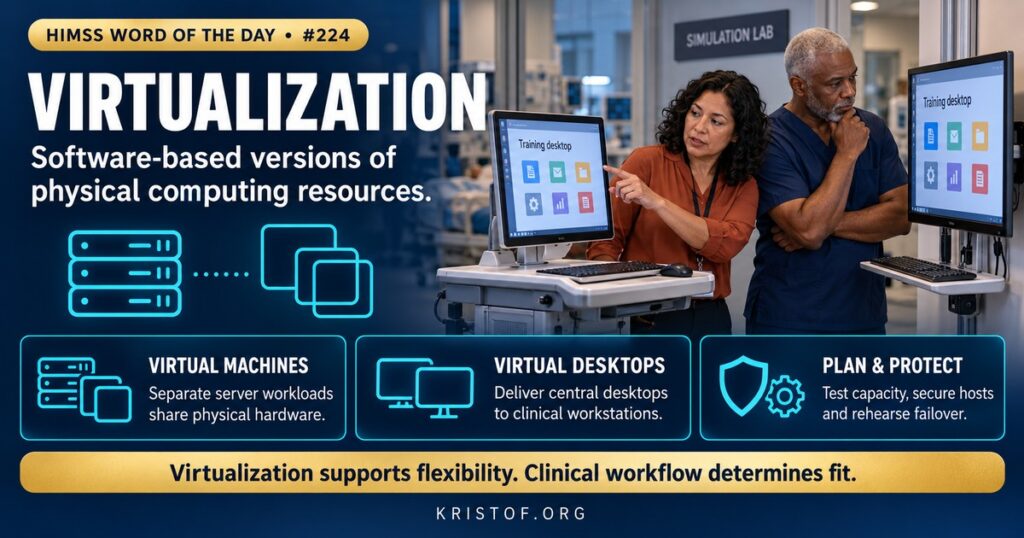
Virtualization is the practice of building software-based stand-ins for resources that would otherwise be physical, including operating systems, servers, storage, and networks. The HIMSS Dictionary notes that the typical aim is to simplify central administration while making it easier to scale and balance workloads, and it places virtualization within a broader trend toward self-managing IT environments and utility computing, in which processing power is paid for as needed.
In a hospital, virtualization usually shows up in two places. Server virtualization runs many virtual machines on a smaller number of physical servers, each virtual machine behaving like its own computer. Desktop virtualization runs a clinician’s desktop in the data center and delivers it to whatever device the clinician uses.
| Type | What Is Virtualized | Typical Healthcare Use |
|---|---|---|
| Server Virtualization | Operating systems and server workloads | Hosting EHR components, interfaces, and ancillary systems |
| Desktop Virtualization (VDI) | The user’s desktop environment | Roaming sessions for clinicians across shared workstations |
| Storage Virtualization | Pools of storage presented as one resource | Flexible capacity for imaging and records |
| Network Virtualization | Virtual networks over shared infrastructure | Segmenting clinical, guest, and device traffic |
| Application Virtualization | Applications delivered without full local installation | Legacy clinical applications on modern devices |
⚠️ Exam Alert: A hypervisor is the software layer that creates and runs virtual machines. Virtualization is not the same as cloud computing, though the cloud often relies on it. VDI virtualizes the desktop, while server virtualization virtualizes the server. Virtualization can improve efficiency but adds its own security considerations.
🌐 Why It Matters: Real-World Healthcare IT Context
Hospitals run hundreds of applications, and many have different operating system and hardware needs. Without virtualization each would need its own physical server, which wastes capacity and drives up cost, space, power, and maintenance. With virtualization, workloads share hardware, can be moved between hosts, and can be copied or restored more quickly. Test and training environments can be created from templates, and disaster recovery can use replicated virtual machines at a second site.
Desktop virtualization adds clinical flexibility. A nurse can start a session on one workstation, move to another room, and resume in the same state. IT can patch one central image rather than thousands of devices, and sensitive data stay in the data center rather than on local disks. These features help with security and consistency, but they also make the data center a critical dependency: if the virtual desktop environment fails, many users lose their workstations at once.
NIST’s Special Publication 800-125 discusses the security concerns of full virtualization technologies for server and desktop virtualization and gives recommendations for addressing them. Full virtualization runs one or more operating systems and their applications on top of virtual hardware, and NIST notes it is used for operational efficiency, as in cloud computing, and for running applications for multiple operating systems on one computer. The security concerns follow from the design: the hypervisor becomes a high-value target, many workloads share a host, virtual machines can sprawl without governance, and management tools hold broad power. Sound practice includes securing and patching the hypervisor, restricting administrative access, separating workloads by sensitivity, monitoring virtual networks, protecting virtual machine images and snapshots, and including virtual infrastructure in vulnerability and backup programs.
Cloud services build on the same idea. NIST’s definition of cloud computing and HHS guidance on HIPAA and cloud services help organizations decide when to run virtual workloads on their own hardware and when to rent them. Whether on premises or in the cloud, HIPAA requirements for access control, audit controls, and business associate agreements still apply.
Clinical fit matters as much as technical design. A 2026 qualitative study in an Australian emergency department examined a system that combined single sign-on, tap-on-tap-off badge login, and virtual desktops. Interviews with 17 doctors and nurses and about seven hours of observation showed that some participants found the system useful, but most questioned its value for emergency work. Login time was relatively long for ED needs, and workarounds led to people being logged out in the middle of a task. Clinicians also saw redundant access control and potential new risks with the virtual desktop. The authors recommended studying how clinicians use computers, and which systems they use, before implementation. The message is that a technology that works well in a data center can fail at the point of care if it does not fit the pace and movement of the work.
Capacity planning is another reason clinicians should care. Virtual environments are sized for expected peaks, but go-lives, upgrades, and unplanned surges, such as a disaster or a pandemic wave, can exceed estimates. Performance problems often show up first as slow screens, which clinicians experience as an application problem rather than an infrastructure one.
Common virtualization problems:
- Sizing the environment for average load rather than peak load
- Single points of failure in the virtual desktop platform
- Virtual machine sprawl with unpatched or unowned systems
- Hypervisor and management tools left with broad administrative access
- Login or session policies that conflict with clinical workflow
- Backups that miss virtual machine images or configuration
What supports healthy virtualization:
- Observation of clinical workflows before design
- Capacity plans tested against peak events
- Hardened, patched hypervisors and restricted administration
- Network segmentation for virtual workloads
- Redundant hosts and tested failover
- Inventory and lifecycle governance for virtual machines
🏥 The Nurse’s Perspective: Clinical, Bedside, & Workflow
Nurses interact with virtualization through the desktop that follows them and the applications that stay up or go down.
At the Bedside
A roaming virtual desktop can save time when a nurse moves between rooms, if sessions resume quickly and reliably. If a session takes too long to start, or logs out in the middle of documentation, staff may prop doors, leave sessions open, or delay charting. Reporting these patterns with specific times and locations helps IT find the cause.
Slow screens at the start of shift often point to capacity, not user error. Nurses who notice that slowdowns follow a pattern, such as shift change, help analysts spot it.
In Clinical Workflow
Different units have different needs. Emergency, operating room, intensive care, and mobile workstations on wheels each handle logins, badge taps, and session persistence differently. Nurse leaders and informaticists take part in pilot testing so that settings fit the real flow of work.
During outages, understanding which workstations and applications depend on the virtual environment guides downtime decisions. Local fallback options, if any exist, should be known by charge nurses.
In EHR Implementation (Go-Live Perspective)
An Epic Go-Live typically relies on virtual desktops, hosted application servers, or both. Teams run load tests, practice login scenarios, and check that printers, scanners, and badge readers work in sessions. At-the-elbow support analysts spot the first signs of performance trouble and escalate them while the command center can still add capacity.
🎓 CAHIMS / CPHIMS & HIMSS Perspective
CAHIMS Exam Domain Mapping
Virtualization appears in infrastructure, security, and operations questions:
| CAHIMS Domain | How Virtualization Appears |
|---|---|
| Healthcare & Technology Environments | Cloud and hosted models, HIPAA considerations |
| Clinical Informatics | Clinician workstation experience, session persistence, workflow fit |
| Healthcare Information & Systems Management | Hypervisors, virtual machines, VDI, capacity and resilience |
| Management & Leadership | Cost, vendor choices, risk, lifecycle governance |
Key Terms to Know Alongside Virtualization
- Hypervisor — software that creates and manages virtual machines
- Virtual Machine (VM) — software-defined computer running on shared hardware
- VDI (Virtual Desktop Infrastructure) — delivery of desktops from central servers
- Cloud Computing — on-demand access to shared computing resources
- Scalability — ability to handle growth in workload
- Failover — automatic move of a workload to standby capacity
HIMSS Organizational Position
HIMSS supports resilient, secure health IT infrastructure through its education, research, and Healthcare Cybersecurity Community. Members can find related resources through the HIMSS Resource Center.
🔗 Explore Further: External References
- NIST — SP 800-125, Guide to Security for Full Virtualization Technologies https://csrc.nist.gov/pubs/sp/800/125/final
- NIST — SP 800-145, The NIST Definition of Cloud Computing https://csrc.nist.gov/pubs/sp/800/145/final
- HHS — Guidance on HIPAA and Cloud Computing https://www.hhs.gov/hipaa/for-professionals/special-topics/health-information-technology/cloud-computing/index.html
- Baysari et al. (2026), BMC Medical Informatics and Decision Making — Understanding How a Tap On/Tap Off System Supports Clinical Work in an Emergency Department: A Qualitative Study https://pubmed.ncbi.nlm.nih.gov/41794736/
- Gellert et al. (2025), Advances in Health Information Science and Practice — Clinician Time Savings and Financial Value of Workstation Single Sign-On and Access Management in the United Kingdom and Ireland https://pubmed.ncbi.nlm.nih.gov/41333334/
- eCFR — 45 CFR 164.312, Technical Safeguards https://www.ecfr.gov/current/title-45/subtitle-A/subchapter-C/part-164/subpart-C/section-164.312
Term source: HIMSS Dictionary of Health Information and Technology Terms, Acronyms, and Organizations, 6th Edition (2025). All definitions in this series are paraphrased for editorial purposes. Readers are encouraged to consult the primary source for exact language.
Eric Andrew Kristof, RN, CAHIMS is a Healthcare IT professional and HIMSS Arkansas Chapter member based in Hot Springs Village, AR, with hands-on Epic Go-Live experience and a diverse healthcare and IT background. He writes at kristof.org at the intersection of clinical care and healthcare technology.
Leave a Reply