By Eric Andrew Kristof, RN, CAHIMS | Healthcare IT Professional | HIMSS Arkansas Chapter Member
About This Series: The HIMSS Word of the Day is a running blog series drawing from the HIMSS Dictionary of Health Information and Technology Terms, Acronyms, and Organizations, 6th Edition (2025) — the authoritative reference for healthcare IT professionals and the primary study resource for CAHIMS and CPHIMS certification. Each post paraphrases the term in plain language, grounds it in real-world healthcare IT context, and adds a bedside nursing perspective you won’t find in a textbook.
📖 The Term: Section 508
Source: HIMSS Dictionary of Health Information and Technology Terms, Acronyms, and Organizations, 6th Edition (2025)
🔍 Plain-Language Definition
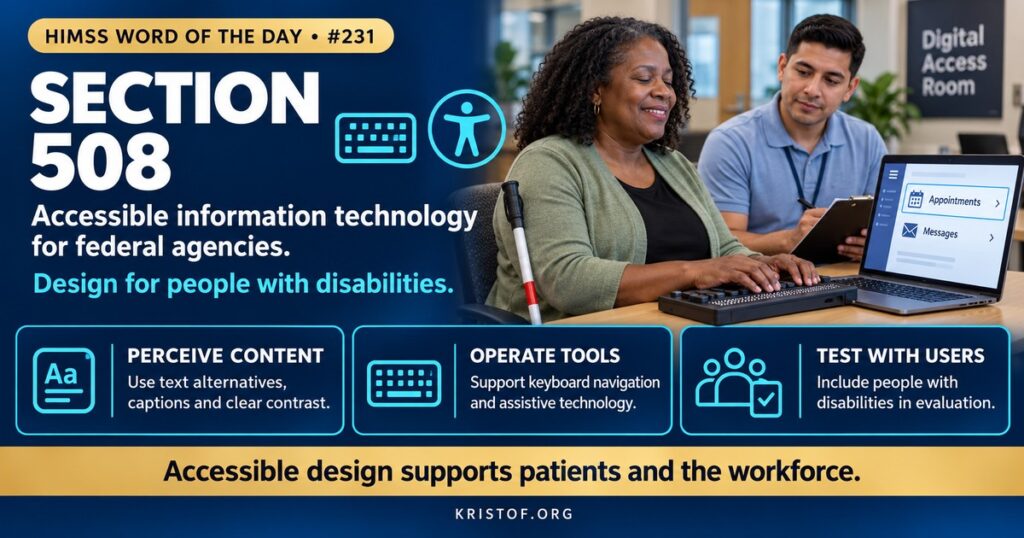
Section 508 is the part of the U.S. Rehabilitation Act that requires federal agencies to make their electronic and information technology accessible to people with disabilities. The HIMSS Dictionary explains that access for people with disabilities must be equivalent to the access offered to people without disabilities, and that the law also encourages the development of technologies that help people with disabilities retrieve electronic data and use information technology more readily.
The technical standards live in federal regulation. Title 36, Part 1194 of the Code of Federal Regulations sets out the standards for information and communication technology (ICT) that federal agencies develop, procure, maintain, or use. The current standards were refreshed in a rule published January 18, 2017, and they cover websites, software, documents, hardware, and support services.
| Concept | What It Is | Who It Applies To |
|---|---|---|
| Section 508 | Federal requirement for accessible ICT | Federal agencies and, through procurement, their vendors |
| Section 504 | Prohibition of disability discrimination by recipients of federal funds | Recipients of federal financial assistance, including HHS recipients |
| WCAG | W3C technical guidelines for accessible web content | Voluntary standard referenced by laws and rules |
| ADA | Civil rights law covering public accommodations and government services | Broad, including many health care providers |
| Assistive Technology | Tools such as screen readers and switch devices | Used by people with disabilities |
⚠️ Exam Alert: Section 508 applies directly to federal agencies and shapes vendor products sold to them. Section 504 covers recipients of federal funds, and the HHS rule under it requires web and mobile app accessibility based on WCAG 2.1 Level AA. WCAG is a set of guidelines, not a law by itself.
🌐 Why It Matters: Real-World Healthcare IT Context
Many people use health IT with the help of assistive technology or with needs that standard designs do not meet. People who are blind may rely on screen readers, people with low vision on magnification and contrast, people with motor limitations on keyboard-only navigation or voice control, and people who are deaf on captions and text alternatives. People with cognitive or communication differences benefit from plain language and consistent layouts. If a portal, a scheduling site, a kiosk, or a telehealth app does not work for them, they lose access to care and to their own information.
Section 508 sets the baseline for the federal government, including health care organizations such as the Department of Veterans Affairs and agencies like CMS and HHS. Because federal agencies buy technology, vendors often document 508 conformance in a document called a Voluntary Product Accessibility Template, and many commercial health IT products are designed with those standards in mind. The 508 website maintained by the General Services Administration offers policy, training, and testing guidance.
Web accessibility is usually measured against the Web Content Accessibility Guidelines from the World Wide Web Consortium. WCAG organizes its success criteria around four principles: content must be perceivable, operable, understandable, and robust. Version 2.1 added criteria for mobile and low vision users, and conformance is described in levels A, AA, and AAA.
The regulatory pressure on health care has increased. In 2024, HHS adopted a rule under Section 504 of the Rehabilitation Act requiring recipients of HHS financial assistance to make web content and mobile apps accessible. In May 2026, HHS issued an interim final rule at 45 CFR Part 84 extending the compliance dates, so that recipients with 15 or more employees must comply by May 11, 2027, and recipients with fewer than 15 employees by May 10, 2028. HHS explained that it believed it would be difficult for all entities to meet the original dates. Organizations should check the current text and any later changes, but the direction is clear: accessibility is becoming a compliance expectation for health care, not an optional nicety.
Research shows the gap. A 2025 study of Australian health service websites for people who have had a stroke evaluated 185 webpages with an automated accessibility tool and a checklist for communication, cognitive, and sensory needs. Most pages, 150 of 185 or 81.1 percent, had at least one WCAG error. A 2023 evaluation of dermatology home pages from the three largest hospitals in each of the 50 states, 150 sites in all, found an average of 5.7 Level A issues per site under WCAG 2.1 and no website that fully met the standards. Automated tools catch only part of the problem, so these numbers are likely lower bounds, but they show that even well-resourced institutions fall short.
Accessibility is also good design for everyone. Clear headings, sufficient contrast, descriptive links, captions, and keyboard operation help people using phones in bright light, tired clinicians, and patients with temporary injuries. Building accessibility into requirements, procurement, design, and testing is cheaper than retrofitting.
Common accessibility problems in health IT:
- Images and icons without text alternatives
- Low contrast text and color-only status cues
- Forms and portals that cannot be used by keyboard alone
- Videos without captions or transcripts
- PDF forms and scanned documents that screen readers cannot read
- Third-party tools added to the site without accessibility review
What supports accessible health IT:
- Accessibility requirements in procurement and contracts, with vendor conformance reports
- Testing with automated tools and with real assistive technology users
- Design systems with accessible components
- Plain language and readable patient education materials
- An accessibility statement and a clear way to request help
- Training for developers, content authors, and clinical staff
🏥 The Nurse’s Perspective: Clinical, Bedside, & Workflow
Nurses see accessibility from both sides: as clinicians who use technology and as advocates for patients who may not be able to.
At the Bedside
A patient who is blind may need discharge instructions in a format that works with a screen reader or in braille. A patient who is deaf may need an interpreter or captioned video visit. A patient with limited dexterity may not be able to use a touch-screen check-in. Nurses who notice that a tablet, portal, or kiosk does not work for a patient can arrange an alternative right away and report the barrier.
Accessible communication is also part of safe care. Teach-back works best when materials match how the patient can receive information.
In Clinical Workflow
Nurse leaders and educators review patient education handouts, portal messages, and videos for readability and accessibility. Staff with disabilities also use the EHR and learning systems, so accessibility affects the workforce as well.
Nurse informaticists contribute during selection and testing. They ask vendors for accessibility documentation, involve patients and staff who use assistive technology in usability testing, and make sure nursing-facing and patient-facing screens work with common tools.
In EHR Implementation (Go-Live Perspective)
An Epic Go-Live includes patient portal activation, bedside devices, and kiosks. Teams test those with assistive technology and prepare alternative workflows. At-the-elbow support analysts help staff and patients enrolling in the portal and document any barriers they find so they can be reported to the vendor and the accessibility lead.
🎓 CAHIMS / CPHIMS & HIMSS Perspective
CAHIMS Exam Domain Mapping
Section 508 appears in regulation, usability, and procurement questions:
| CAHIMS Domain | How Section 508 Appears |
|---|---|
| Healthcare & Technology Environments | Federal accessibility laws, civil rights requirements, standards |
| Clinical Informatics | Usability, patient-facing design, health literacy and equity |
| Healthcare Information & Systems Management | Accessibility testing, vendor conformance reports, content management |
| Management & Leadership | Procurement requirements, compliance planning, risk management |
Key Terms to Know Alongside Section 508
- WCAG (Web Content Accessibility Guidelines) — W3C guidelines for accessible web content
- Assistive Technology — devices and software that help people with disabilities use technology
- Screen Reader — software that reads on-screen content aloud or to a braille display
- VPAT (Voluntary Product Accessibility Template) — vendor document describing accessibility conformance
- Section 504 — disability nondiscrimination requirement for recipients of federal funds
- ICT (Information and Communication Technology) — technology covered by accessibility standards
HIMSS Organizational Position
HIMSS supports health equity and inclusive design through its Global Health Equity Community, research, and education. Members can find related resources through the HIMSS Resource Center and community pages.
🔗 Explore Further: External References
- Section508.gov — Laws and Policies https://www.section508.gov/manage/laws-and-policies/
- eCFR — 36 CFR Part 1194, Information and Communication Technology Standards and Guidelines https://www.ecfr.gov/current/title-36/chapter-XI/part-1194
- W3C — Web Content Accessibility Guidelines (WCAG) 2.1 https://www.w3.org/TR/WCAG21/
- HHS — Extension of Compliance Dates for Nondiscrimination on the Basis of Disability; Accessibility of Web Content and Mobile Applications (Interim Final Rule, 45 CFR Part 84) https://public-inspection.federalregister.gov/2026-09266.pdf
- Giummarra et al. (2025), International Journal for Equity in Health — How Accessible Are the Websites of Health Services for People Who Have Had a Stroke? https://pubmed.ncbi.nlm.nih.gov/40275299/
- Kaundinya et al. (2023), Archives of Dermatological Research — Adherence of Dermatology Home Page Websites to Accessibility Guidelines for Persons With Disabilities https://pubmed.ncbi.nlm.nih.gov/36482256/
Term source: HIMSS Dictionary of Health Information and Technology Terms, Acronyms, and Organizations, 6th Edition (2025). All definitions in this series are paraphrased for editorial purposes. Readers are encouraged to consult the primary source for exact language.
Eric Andrew Kristof, RN, CAHIMS is a Healthcare IT professional and HIMSS Arkansas Chapter member based in Hot Springs Village, AR, with hands-on Epic Go-Live experience and a diverse healthcare and IT background. He writes at kristof.org at the intersection of clinical care and healthcare technology.
Leave a Reply