By Eric Andrew Kristof, RN, CAHIMS | Healthcare IT Professional | HIMSS Arkansas Chapter Member
About This Series: The HIMSS Word of the Day is a running blog series drawing from the HIMSS Dictionary of Health Information and Technology Terms, Acronyms, and Organizations, 6th Edition (2025) — the authoritative reference for healthcare IT professionals and the primary study resource for CAHIMS and CPHIMS certification. Each post paraphrases the term in plain language, grounds it in real-world healthcare IT context, and adds a bedside nursing perspective you won’t find in a textbook.
📖 The Term: Malware
Source: HIMSS Dictionary of Health Information and Technology Terms, Acronyms, and Organizations, 6th Edition (2025)
🔍 Plain-Language Definition
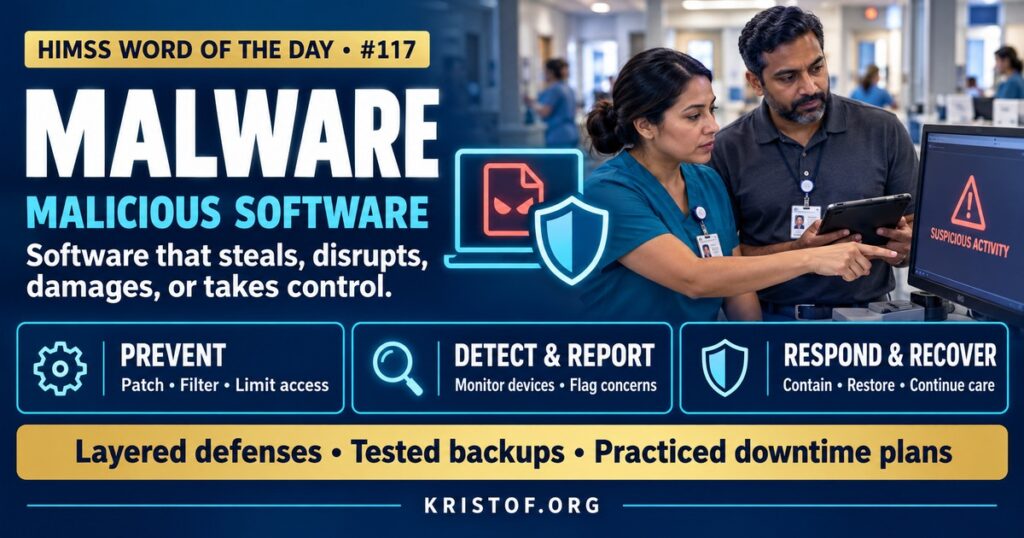
Malware, short for malicious software, is any program or code designed to damage, disrupt, spy on, or gain unauthorized control of computers, networks, devices, or data.
The HIMSS Dictionary describes malware as any program or file built to damage computers, networks, or servers. It lists types including viruses, worms, Trojan horses, ransomware, and spyware, and explains that they can steal, lock up, or erase sensitive data, take over or change essential computer functions, and spy on what users do.
| Malware Type | How It Works | Potential Healthcare Impact |
|---|---|---|
| Virus | Attaches to files and spreads when they are run | Corrupted files on workstations |
| Worm | Spreads automatically across networks without user action | Rapid spread to many devices, including unpatched systems |
| Trojan | Disguises itself as legitimate software | Hidden remote access for attackers |
| Ransomware | Encrypts data and demands payment | EHR downtime, diverted ambulances, canceled procedures |
| Spyware and Keyloggers | Secretly monitors activity or captures keystrokes | Stolen passwords and patient data |
| Botnet Malware | Turns devices into remotely controlled networks | Infected devices used to attack others |
⚠️ Exam Alert: Malware is the broad category of malicious software. Ransomware is one type that encrypts data for extortion. A worm spreads without user action, while a virus typically needs a host file and user action. Phishing is a common delivery method, not malware itself. HIPAA‘s Security Rule includes protection from malicious software as part of security awareness and training.
🌐 Why It Matters: Real-World Healthcare IT Context
Malware attacks can disrupt patient care directly. In 2017, the WannaCry ransomware worm spread worldwide and disrupted parts of the UK’s National Health Service, leading to canceled appointments and diverted patients. Since then, ransomware attacks on U.S. hospitals have caused EHR downtime, delayed procedures, and ambulance diversions, and research has documented their growing frequency.
Healthcare environments are attractive and vulnerable targets. Hospitals run many legacy systems and medical devices that are difficult to patch, operate around the clock, and depend on rapid access to data. Large workforces and shared workstations increase the chance that a malicious email or download reaches someone.
Malware usually arrives through a few common paths: phishing emails with malicious attachments or links, compromised websites, exploited vulnerabilities in internet-facing systems, stolen remote access credentials, infected removable media, and compromised software updates or vendor connections.
Defense requires layers. NIST’s Guide to Malware Incident Prevention and Handling, SP 800-83, describes prevention measures such as policy, awareness, vulnerability mitigation, and threat mitigation tools, along with incident response steps for detection, containment, eradication, and recovery. Modern endpoint detection and response tools watch for suspicious behavior, not just known signatures, and can isolate infected devices quickly.
Attackers increasingly combine malware with stolen data. In many ransomware incidents, criminals copy data before encrypting systems and then threaten to publish it, a tactic often called double extortion. That means backups alone cannot remove the risk; organizations must also prevent data theft, detect unusual data movement, and be prepared for breach notification obligations.
Recovery depends on preparation. Clean, protected backups, tested restoration procedures, and downtime plans determine how quickly clinical systems return after an attack.
Medical devices and operational technology add special challenges. Imaging systems, lab analyzers, building management systems, and other specialized equipment may run older software, and malware on these systems can disrupt care even if the EHR is unaffected.
Reporting obligations follow many malware incidents. HHS guidance explains that a ransomware attack affecting ePHI is presumed to be a breach unless the organization can demonstrate a low probability that the information was compromised, which brings risk assessment and possible notification duties.
Common malware entry points in healthcare:
- Phishing emails with attachments or links
- Unpatched servers and remote access systems
- Stolen or weak credentials without multifactor authentication
- Infected USB drives and personal devices
- Vendor remote access and software supply chain compromises
- Legacy devices running unsupported operating systems
Layered defenses:
- Email filtering, link scanning, and user reporting
- Endpoint detection and response on servers and workstations
- Timely patching and vulnerability management
- Network segmentation, especially for medical devices
- Least-privilege access and application control
- Protected, tested backups and incident response plans
🏥 The Nurse’s Perspective: Clinical, Bedside, & Workflow
Nurses can both prevent malware infections and help hospitals keep caring for patients when malware strikes.
At the Bedside
Careful email and web habits are a first line of defense. Avoiding unexpected attachments and links, reporting suspicious messages, and never plugging unknown USB drives or personal devices into hospital computers reduce the chance that malware gets in.
Unusual computer behavior deserves a report. Pop-ups demanding payment, files that will not open, unusually slow workstations, or devices behaving strangely may signal malware, and early reporting can help security teams contain an infection before it spreads.
Personal devices should stay separate from clinical systems. Charging a phone through a hospital workstation’s USB port or transferring files from home can introduce malware without anyone noticing.
Shared workstations call for care as well. Logging out completely and avoiding downloads on shared computers limits how far malware can travel if one session is compromised.
In Clinical Workflow
Medical devices can be affected too. If a connected device displays unexpected messages or loses connectivity, reporting it to clinical engineering helps determine whether there is a security issue.
When malware forces systems offline, nurses keep care going with downtime procedures: paper documentation, printed reports, manual medication verification, and clear communication. Nurses who have practiced downtime are better prepared when an outage lasts days rather than hours.
In EHR Implementation (Go-Live Perspective)
During an Epic Go-Live, new workstations, servers, and devices are deployed with security software, current patches, and standard configurations. Infrastructure teams verify that endpoint protection is active and that devices are segmented appropriately.
At-the-elbow support analysts reinforce safe habits and route suspicious activity to the security team. Go-Live periods, with many new emails about accounts and training, can also bring phishing attempts that deliver malware, so vigilance matters.
🎓 CAHIMS / CPHIMS & HIMSS Perspective
CAHIMS Exam Domain Mapping
Malware appears in security and risk management questions:
| CAHIMS Domain | How Malware Appears |
|---|---|
| Healthcare & Technology Environments | Threat landscape; notable attacks; HIPAA malicious software protections |
| Clinical Informatics | Downtime procedures; clinical impact of attacks; user reporting |
| Healthcare Information & Systems Management | Endpoint protection, patching, segmentation, backups, incident response |
| Management & Leadership | Risk management, cyber insurance, business continuity, workforce training |
Key Terms to Know Alongside Malware
- Ransomware — malware that encrypts systems or data and demands payment
- Worm — self-replicating malware that spreads across networks without user action
- Trojan Horse — malware disguised as legitimate software
- Endpoint Detection and Response (EDR) — tools that monitor devices for malicious behavior and support response
- Patch Management — the process of applying software updates to fix vulnerabilities
- Incident Response — the organized approach to detecting, containing, and recovering from security incidents
HIMSS Organizational Position
HIMSS treats malware and ransomware as patient safety threats and addresses them through its Healthcare Cybersecurity Community, research on healthcare cybersecurity, and policy engagement. Members can find related education and research through the HIMSS Resource Center.
🔗 Explore Further: External References
- NIST — SP 800-83 Rev. 1, Guide to Malware Incident Prevention and Handling https://csrc.nist.gov/pubs/sp/800/83/r1/final
- HHS — Ransomware Fact Sheet https://www.hhs.gov/hipaa/for-professionals/security/guidance/cybersecurity/ransomware-fact-sheet/index.html
- HHS 405(d) Program — Health Industry Cybersecurity Practices https://405d.hhs.gov/
- Neprash et al. (2022), JAMA Health Forum — Trends in Ransomware Attacks on US Health Care Delivery Organizations https://pubmed.ncbi.nlm.nih.gov/36580326/
- FDA — Medical Device Cybersecurity https://www.fda.gov/medical-devices/digital-health-center-excellence/cybersecurity
- HIMSS — Healthcare Cybersecurity Community https://www.himss.org/networking/communities/healthcare-cybersecurity/
Term source: HIMSS Dictionary of Health Information and Technology Terms, Acronyms, and Organizations, 6th Edition (2025). All definitions in this series are paraphrased for editorial purposes. Readers are encouraged to consult the primary source for exact language.
Eric Andrew Kristof, RN, CAHIMS is a Healthcare IT professional and HIMSS Arkansas Chapter member based in Hot Springs Village, AR, with hands-on Epic Go-Live experience and a diverse healthcare and IT background. He writes at kristof.org at the intersection of clinical care and healthcare technology.
Leave a Reply