By Eric Andrew Kristof, RN, CAHIMS | Healthcare IT Professional | HIMSS Arkansas Chapter Member
About This Series: The HIMSS Word of the Day is a running blog series drawing from the HIMSS Dictionary of Health Information and Technology Terms, Acronyms, and Organizations, 6th Edition (2025) — the authoritative reference for healthcare IT professionals and the primary study resource for CAHIMS and CPHIMS certification. Each post paraphrases the term in plain language, grounds it in real-world healthcare IT context, and adds a bedside nursing perspective you won’t find in a textbook.
📖 The Term: Wi-Fi Protected Access (WPA)
Source: HIMSS Dictionary of Health Information and Technology Terms, Acronyms, and Organizations, 6th Edition (2025)
🔍 Plain-Language Definition
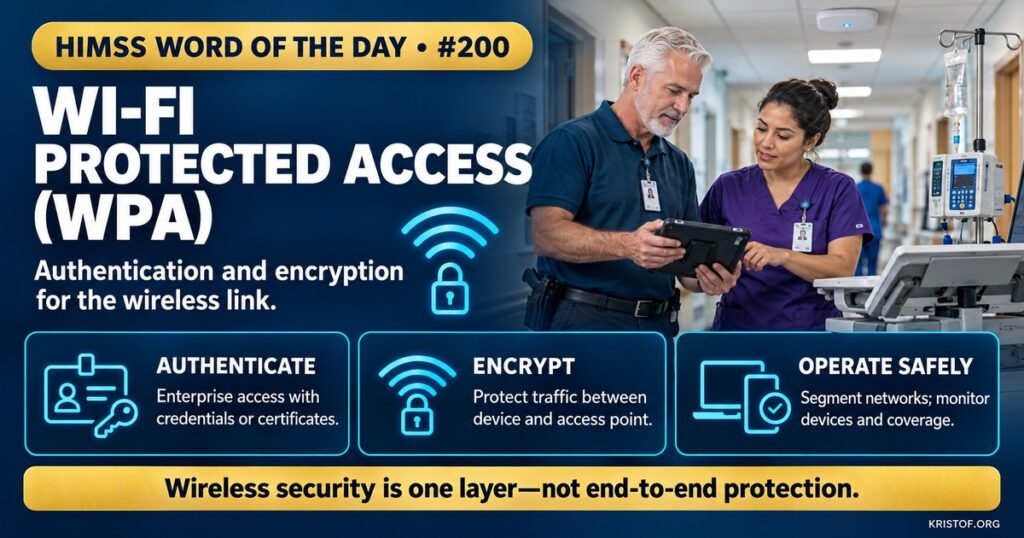
Wi-Fi Protected Access (WPA) is a family of security protocols for wireless networks. It was developed by the networking industry to fix the shortcomings of the earlier Wired Equivalent Privacy (WEP) standard, adding stronger encryption and built-in authentication that is easier to manage.
The HIMSS Dictionary notes that the original WPA used the Temporal Key Integrity Protocol (TKIP) and that WPA3 is now the current version. In practice, hospitals encounter three generations: WPA, WPA2, and WPA3, along with older WEP networks that should no longer exist.
| Protocol | Approach | Status in Healthcare Settings |
|---|---|---|
| WEP | Early encryption with serious design flaws | Obsolete and should not be used |
| WPA | Interim fix using TKIP encryption | Legacy; replaced by stronger designs |
| WPA2 | AES-based encryption with personal and enterprise modes | Widely deployed; common baseline |
| WPA3 | Newer authentication and stronger protections | Current generation; required for certified devices |
| 802.1X Enterprise Authentication | Per-user or per-device credentials via an authentication server | Common for clinical networks |
⚠️ Exam Alert: WPA is a security protocol for Wi-Fi networks, not a network name or a device. WEP is the older, broken predecessor. Personal modes use a shared passphrase, while Enterprise modes use individual credentials or certificates checked by an authentication server. WPA protects the wireless link only and does not replace segmentation, device management, or encryption of data in transit end to end.
🌐 Why It Matters: Real-World Healthcare IT Context
Hospitals depend on wireless networks. Workstations on wheels, tablets, phones, infusion pumps, monitors, location tags, and patient-owned devices all connect over Wi-Fi, and many carry protected health information or control clinical equipment. HIPAA‘s Security Rule requires technical safeguards for protecting electronic protected health information in transit, and wireless links are a place where weak protection is especially risky.
WEP failed because researchers showed that its encryption could be broken quickly with commonly available tools, so an attacker within range could read or alter traffic. WPA was introduced as an interim fix that could run on existing hardware. WPA2 followed with stronger AES-based encryption and became the baseline for years. WPA3 is the latest generation. According to the Wi-Fi Alliance, WPA3 is mandatory for Wi-Fi CERTIFIED devices, disallows outdated legacy protocols, requires protected management frames, gives personal networks stronger protection against password guessing, and offers higher-grade security for enterprise networks that handle sensitive data.
Mode matters. Personal modes, which share one passphrase, are convenient but weak for large environments: anyone who learns the passphrase can join, and staff turnover makes changing it difficult. Enterprise modes use 802.1X authentication with individual credentials or device certificates, allowing access to be granted, logged, and revoked per user or device. Most clinical networks use enterprise authentication, with separate networks for guests and personal devices.
Legacy devices are the hard part. Infusion pumps, patient monitors, and other equipment often have long service lives and may support only older protocols. Organizations may keep such devices on a dedicated network with restricted access, plan upgrades, and work with manufacturers on firmware and replacement options. Network segmentation limits what a compromised device can reach.
Wireless security is also an availability issue. A Japanese university hospital described the security countermeasures and design points it used to make its wireless LAN both secure and always available, noting that security measures differ depending on whether the goal is preventing illegal use or ensuring availability. Poor coverage, interference, and misconfigured authentication can disconnect devices at the bedside as effectively as an attack.
NIST offers detailed guidance. Special Publication 800-153, Guidelines for Securing Wireless Local Area Networks, covers security of enterprise wireless networks, and SP 800-97 explains the IEEE 802.11i robust security network framework on which WPA2 builds. The FDA also addresses wireless functionality in its medical device cybersecurity expectations for manufacturers.
Operations complete the picture: inventory every wireless device, retire obsolete protocols, monitor for rogue access points, rotate credentials and certificates, review logs, and test coverage after changes.
Common wireless security problems:
- Legacy devices that support only outdated protocols
- Shared passphrases that are never rotated
- Rogue access points or unauthorized hotspots
- Guest and clinical traffic mixed on one network
- Certificates that expire and disconnect devices
- Coverage gaps that push staff to unapproved connections
What supports secure hospital Wi-Fi:
- WPA2 or WPA3 with enterprise authentication for clinical networks
- Separate networks for guests, personal devices, and medical devices
- A current inventory of wireless devices and their capabilities
- Certificate and credential lifecycle management
- Monitoring for rogue access points and anomalies
- Planned replacement of devices that cannot be secured
🏥 The Nurse’s Perspective: Clinical, Bedside, & Workflow
Nurses rarely think about Wi-Fi protocols until a device will not connect, yet secure wireless is part of safe care.
At the Bedside
Wireless problems appear as devices that drop off the network, scanners that stop responding, or tablets that cannot sign in. Reporting the device, location, and time helps determine whether the cause is coverage, authentication, or a configuration change.
Connecting clinical devices or personal phones to unapproved hotspots or networks bypasses protections designed for patient information. Using the networks provided for each purpose keeps traffic where it can be monitored and secured.
In Clinical Workflow
Devices that have been reconfigured, repaired, or moved sometimes lose their network settings. Biomedical engineering and IT usually handle these changes, so nurses can ask that rather than trying to change settings themselves.
Staff who bring personal devices should follow the organization’s bring-your-own-device policy and use the designated network. Sharing network credentials or leaving a device logged in on an unlocked screen undermines the layers behind the Wi-Fi.
Nurse informaticists help by documenting which workflows depend on wireless devices, ensuring that coverage is tested in places where care happens, such as bathrooms, stairwells, and patient rooms, and providing clinical input on downtime plans.
In EHR Implementation (Go-Live Perspective)
An Epic Go-Live relies on wireless coverage for workstations on wheels, handheld scanners, and mobile devices. Readiness checks include walking the units to test connectivity, confirming authentication settings, and verifying that every device is on the correct network.
At-the-elbow support analysts often see connection issues first. Quick escalation of dead zones and authentication failures keeps medication scanning and documentation working during the busiest days.
🎓 CAHIMS / CPHIMS & HIMSS Perspective
CAHIMS Exam Domain Mapping
Wireless security appears in infrastructure and cybersecurity questions:
| CAHIMS Domain | How WPA Appears |
|---|---|
| Healthcare & Technology Environments | HIPAA technical safeguards, mobile and wireless technology |
| Clinical Informatics | Impact of connectivity on workflow, device use at the bedside |
| Healthcare Information & Systems Management | Wireless architecture, authentication, segmentation, monitoring |
| Management & Leadership | Device lifecycle planning, risk assessment, vendor requirements |
Key Terms to Know Alongside WPA
- WEP (Wired Equivalent Privacy) — early Wi-Fi security standard with serious flaws
- 802.1X — port-based authentication framework used for enterprise Wi-Fi
- TKIP and AES — encryption methods used by WPA and WPA2, respectively
- Network Segmentation — dividing a network to limit access and contain compromise
- Rogue Access Point — unauthorized wireless access point connected to the network
- Protected Management Frames (PMF) — protections for wireless management traffic required by WPA3
HIMSS Organizational Position
HIMSS supports healthcare cybersecurity through its Healthcare Cybersecurity Community, education, and research. Members can find related resources through the HIMSS Resource Center.
🔗 Explore Further: External References
- Wi-Fi Alliance — Security https://www.wi-fi.org/security
- NIST — SP 800-153, Guidelines for Securing Wireless Local Area Networks (WLANs) https://csrc.nist.gov/pubs/sp/800/153/final
- NIST — SP 800-97, Establishing Wireless Robust Security Networks: A Guide to IEEE 802.11i https://csrc.nist.gov/pubs/sp/800/97/final
- Hanada et al. (2013), Journal of Medical Systems — Installation of Secure, Always Available Wireless LAN Systems as a Component of the Hospital Communication Infrastructure https://pubmed.ncbi.nlm.nih.gov/23519703/
- eCFR — 45 CFR 164.312, Technical Safeguards https://www.ecfr.gov/current/title-45/subtitle-A/subchapter-C/part-164/subpart-C/section-164.312
- FDA — Cybersecurity in Medical Devices https://www.fda.gov/medical-devices/digital-health-center-excellence/cybersecurity
Term source: HIMSS Dictionary of Health Information and Technology Terms, Acronyms, and Organizations, 6th Edition (2025). All definitions in this series are paraphrased for editorial purposes. Readers are encouraged to consult the primary source for exact language.
Eric Andrew Kristof, RN, CAHIMS is a Healthcare IT professional and HIMSS Arkansas Chapter member based in Hot Springs Village, AR, with hands-on Epic Go-Live experience and a diverse healthcare and IT background. He writes at kristof.org at the intersection of clinical care and healthcare technology.
Leave a Reply