By Eric Andrew Kristof, RN, CAHIMS | Healthcare IT Professional | HIMSS Arkansas Chapter Member
About This Series: The HIMSS Word of the Day is a running blog series drawing from the HIMSS Dictionary of Health Information and Technology Terms, Acronyms, and Organizations, 6th Edition (2025) — the authoritative reference for healthcare IT professionals and the primary study resource for CAHIMS and CPHIMS certification. Each post paraphrases the term in plain language, grounds it in real-world healthcare IT context, and adds a bedside nursing perspective you won’t find in a textbook.
📖 The Term: Bring Your Own Device (BYOD)
Source: HIMSS Dictionary of Health Information and Technology Terms, Acronyms, and Organizations, 6th Edition (2025)
🔍 Plain-Language Definition
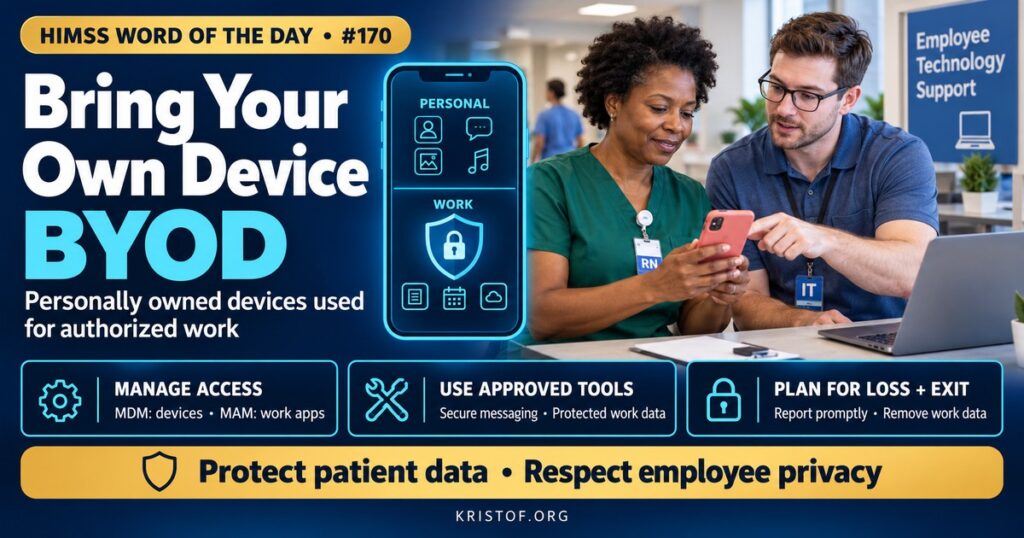
Bring your own device (BYOD) is an organizational policy and practice that allows employees and affiliated clinicians to use personally owned devices, such as smartphones, tablets, and laptops, to access organizational systems and data for work.
The HIMSS Dictionary describes BYOD as an organizational policy that lets employees bring their own mobile devices into work use, either partly or completely.
| BYOD Control | What It Does | Healthcare Example |
|---|---|---|
| Mobile Device Management (MDM) | Enforces device-level settings and can wipe devices | Requiring a passcode and encryption before access |
| Mobile Application Management (MAM) | Manages and protects specific work apps | A secure container for EHR and messaging apps |
| Secure Messaging App | Encrypted, auditable clinical communication | Messaging a physician about a patient instead of using standard text |
| Conditional Access | Grants access only if devices meet requirements | Blocking access from outdated operating systems |
| Remote Wipe | Removes work data from lost or departing users’ devices | Selective wipe when an employee leaves |
| Acceptable Use Policy | Defines rules and expectations | No PHI in personal photo galleries or texts |
⚠️ Exam Alert: BYOD refers to personally owned devices used for work. MDM manages the whole device; MAM manages specific apps and their data, which may be less intrusive for personal devices. Standard SMS texting is generally not appropriate for PHI; organizations use secure messaging platforms.
🌐 Why It Matters: Real-World Healthcare IT Context
Smartphones have become central to clinical communication. Clinicians use them to message colleagues, receive alerts, check schedules, look up references, and sometimes access EHR apps. Providing organization-owned devices to everyone is costly, and many clinicians, especially physicians and contracted staff, prefer using one device. BYOD programs respond to that reality.
The risks are significant. Personal devices may be lost or stolen, run outdated operating systems, contain malicious apps, lack encryption, or be shared with family members. PHI sent by standard text message or stored in personal photo galleries, email, or cloud backups escapes organizational controls. When employees leave, organizational data may remain on their devices.
HIPAA applies regardless of device ownership. Covered entities must protect ePHI on any device used for work, which means BYOD devices must be included in risk analysis and subject to appropriate safeguards. Lost devices containing unencrypted PHI have led to breach notifications and enforcement actions.
NIST has published practical guidance. Its telework and remote access guide addresses securing devices used outside the organization, and its National Cybersecurity Center of Excellence produced SP 1800-22, a practice guide for securing BYOD deployments with mobile device and application management while respecting employee privacy.
Balancing security and privacy is a core challenge. Full device management gives organizations strong control but can feel intrusive to employees, who may worry that employers can see personal information or wipe personal data. Application-level management and work containers keep organizational data separate, allowing selective wipe without touching personal content.
Secure messaging platforms are a cornerstone. They provide encryption, authentication, audit trails, message retention, and integration with directories and on-call schedules. Organizations often also restrict copying data out of work apps, screenshots, and syncing to personal cloud services.
Clinical images present special challenges. Photographing wounds or rashes on personal phones can support care but creates privacy risk unless images are captured through approved apps that send them directly to the record without storing them in the personal gallery.
Equity and fairness deserve attention. Not every employee wants to use a personal phone for work or can afford a device that meets security requirements. Organizations that rely on BYOD for critical communication should provide alternatives, such as shared or organization-owned devices, and consider stipends or support so that participation is truly voluntary. Labor rules about off-hours messaging and compensation may also apply.
Policies and training make technology work. Clear rules about acceptable use, reporting lost devices, and what may never be stored on personal devices, combined with practical training, reduce risky behavior.
Common BYOD risks:
- Lost or stolen devices containing PHI
- Standard texting and personal email used for patient information
- Clinical photos stored in personal galleries and cloud backups
- Outdated operating systems and risky apps
- Organizational data remaining after employment ends
- Employee privacy concerns that reduce enrollment
Practices for safe BYOD programs:
- Mobile device and application management
- Approved secure messaging and clinical photo apps
- Conditional access, passcodes, and encryption requirements
- Selective remote wipe of work data
- Clear acceptable use policies and training
- Inclusion of BYOD in risk analysis and incident response
🏥 The Nurse’s Perspective: Clinical, Bedside, & Workflow
Many nurses carry personal phones, and how those phones are used affects patient privacy.
At the Bedside
Texting patient information through standard messaging apps or taking patient photos on a personal camera roll can expose PHI. Using only approved secure apps for any patient-related communication or images protects patients and nurses alike.
Personal phones should be locked with strong passcodes and kept updated. A lost or stolen phone with work apps installed should be reported immediately so work data can be wiped.
In Clinical Workflow
Secure messaging apps on personal or organizational devices allow quick communication with physicians, pharmacists, and team members. Messages should be clear, include appropriate identifiers, and follow organizational policy about what can be communicated by message versus phone.
Some organizations allow clinical photos through approved apps that store images in the EHR rather than on the device. Following these workflows ensures images are available to the care team and protected.
Nurses should avoid using personal email, cloud storage, or note-taking apps for patient information, such as lists of assignments or handoff notes.
When leaving an organization, removing work apps and confirming that organizational data has been wiped completes responsible offboarding.
Notifications on lock screens can reveal patient information to anyone nearby. Adjusting work app settings to hide message previews protects privacy in public spaces.
In EHR Implementation (Go-Live Perspective)
During an Epic Go-Live, organizations may roll out mobile apps for clinicians, including on personal devices enrolled in management programs. Enrollment sessions and clear instructions help staff set up apps before Go-Live.
At-the-elbow support analysts often help with mobile app access and enrollment issues. Directing staff to approved apps, rather than workarounds such as texting screenshots, protects privacy from the start.
🎓 CAHIMS / CPHIMS & HIMSS Perspective
CAHIMS Exam Domain Mapping
BYOD appears in security and mobile technology questions:
| CAHIMS Domain | How BYOD Appears |
|---|---|
| Healthcare & Technology Environments | Mobile technology trends; HIPAA obligations for personal devices |
| Clinical Informatics | Secure messaging, clinical photography, communication workflows |
| Healthcare Information & Systems Management | MDM, MAM, conditional access, encryption, remote wipe |
| Management & Leadership | Policy, employee privacy, risk management, training |
Key Terms to Know Alongside BYOD
- Mobile Device Management (MDM) — tools for managing and securing entire mobile devices
- Mobile Application Management (MAM) — tools for managing and securing specific apps and their data
- Secure Messaging — encrypted, auditable communication for clinical information
- Containerization — separating work data from personal data on a device
- Remote Wipe — deleting data from a device remotely
- Acceptable Use Policy — rules governing the use of technology for work
HIMSS Organizational Position
HIMSS addresses mobile security and BYOD through its cybersecurity education, research, and Healthcare Cybersecurity Community, emphasizing balanced controls that protect PHI. Members can find related education and research through the HIMSS Resource Center.
🔗 Explore Further: External References
- NIST — SP 1800-22, Mobile Device Security: Bring Your Own Device https://csrc.nist.gov/pubs/sp/1800/22/final
- NIST — SP 800-46 Rev. 2, Guide to Enterprise Telework, Remote Access, and BYOD Security https://csrc.nist.gov/pubs/sp/800/46/r2/final
- HHS — Health Information Technology (HIPAA) https://www.hhs.gov/hipaa/for-professionals/special-topics/health-information-technology/index.html
- HHS — The Security Rule https://www.hhs.gov/hipaa/for-professionals/security/index.html
- HHS 405(d) Program — Health Industry Cybersecurity Practices https://405d.hhs.gov/
- HIMSS — Healthcare Cybersecurity Community https://www.himss.org/networking/communities/healthcare-cybersecurity/
Term source: HIMSS Dictionary of Health Information and Technology Terms, Acronyms, and Organizations, 6th Edition (2025). All definitions in this series are paraphrased for editorial purposes. Readers are encouraged to consult the primary source for exact language.
Eric Andrew Kristof, RN, CAHIMS is a Healthcare IT professional and HIMSS Arkansas Chapter member based in Hot Springs Village, AR, with hands-on Epic Go-Live experience and a diverse healthcare and IT background. He writes at kristof.org at the intersection of clinical care and healthcare technology.
Leave a Reply