By Eric Andrew Kristof, RN, CAHIMS | Healthcare IT Professional | HIMSS Arkansas Chapter Member
About This Series: The HIMSS Word of the Day is a running blog series drawing from the HIMSS Dictionary of Health Information and Technology Terms, Acronyms, and Organizations, 6th Edition (2025) — the authoritative reference for healthcare IT professionals and the primary study resource for CAHIMS and CPHIMS certification. Each post paraphrases the term in plain language, grounds it in real-world healthcare IT context, and adds a bedside nursing perspective you won’t find in a textbook.
📖 The Term: Personal Health Record (PHR)
Source: HIMSS Dictionary of Health Information and Technology Terms, Acronyms, and Organizations, 6th Edition (2025)
🔍 Plain-Language Definition
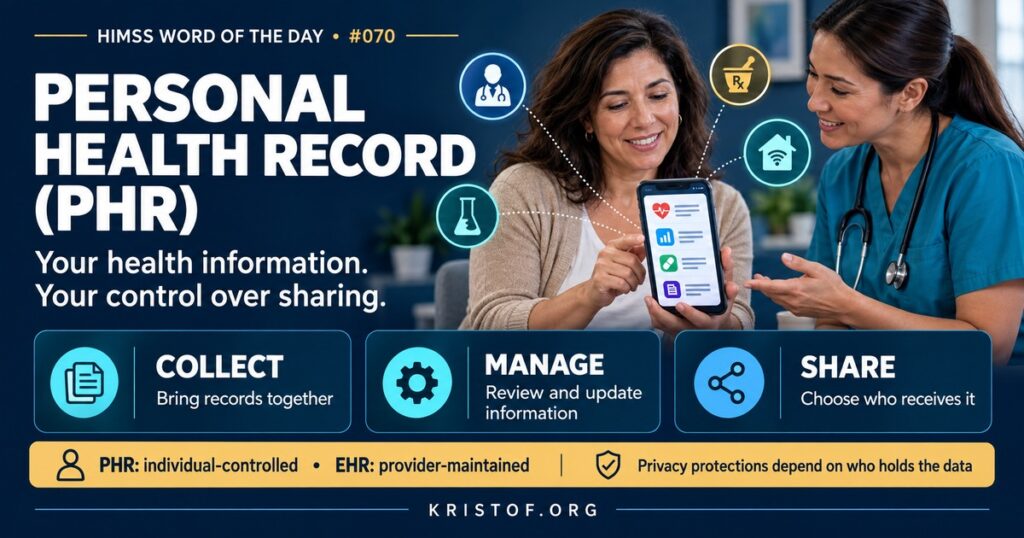
A personal health record (PHR) is an electronic record of a person’s health information that the individual owns, manages, and decides how to share. It can bring together information from several providers, pharmacies, labs, devices, and the person’s own entries.
The HIMSS Dictionary offers three related descriptions. First, it portrays the PHR as a lifelong tool, understandable to a layperson and accessible from anywhere, that helps people organize their information, stay healthy, and manage chronic conditions through interactive tools and a common set of data. The individual, or someone legally acting for them, controls and shares it; it must be protected to keep information private; and it does not count as a legal medical record unless specifically designated as one. Second, the term commonly refers to the consumer’s own version of the health record. Third, the Dictionary describes a PHR as a standards-based electronic record drawn from multiple sources and controlled by the individual.
| Record | Who Controls It | Typical Content | Legal Medical Record? |
|---|---|---|---|
| EHR | The healthcare organization | Comprehensive clinical documentation by care teams | Yes, for the organization |
| Patient Portal | The organization, with patient access | A view of selected EHR data plus messaging and scheduling | Displays parts of the legal record |
| Tethered PHR | The patient, within a provider or health plan platform | Data from one organization, sometimes with patient entries | No |
| Standalone PHR or Health App | The patient | Data aggregated from many sources plus personal entries | No |
⚠️ Exam Alert: An EHR is maintained by providers; a PHR is controlled by the individual. A patient portal is a provider-managed window into the EHR, sometimes called a tethered PHR. Whether HIPAA applies depends on who holds the data: a PHR offered by a covered entity or its business associate is covered, while many consumer apps are not and may fall under FTC rules instead.
🌐 Why It Matters: Real-World Healthcare IT Context
PHRs promise to make patients the hub of their own information. A person who sees several specialists, fills prescriptions at different pharmacies, and uses home devices could, in theory, see everything in one place and share it with any new clinician.
Early PHRs struggled. A widely cited 2006 white paper in JAMIA by Paul Tang and colleagues described PHR definitions, potential benefits, and barriers to adoption, including privacy concerns, the effort of entering data manually, and the lack of easy data exchange with provider systems. Several large consumer PHR services launched in that era and later shut down.
Standards-based APIs changed the picture. Federal rules now require certified EHRs to provide patient access through standardized FHIR APIs, and CMS’s Blue Button 2.0 API lets Medicare beneficiaries share their claims data with apps they choose. As a result, patients can connect PHR apps to many health systems and plans and download their records with much less effort than before.
Clinicians’ use of PHR data is still evolving. Information a patient brings from an app may be accurate and timely, such as a pharmacy fill history, or incomplete and outdated, such as a medication list the patient last updated a year ago. Organizations need policies for how outside, patient-provided information is reviewed, labeled, and, when appropriate, incorporated into the legal record, so clinicians know what they are looking at and where it came from.
Privacy is the central question. When a patient moves data from a provider into a consumer app, HIPAA may no longer protect it. The app’s privacy policy and consumer protection law, including FTC rules on breaches of personal health records, govern what happens next. Patients often do not realize that difference.
Common PHR challenges:
- Incomplete data when not every source connects
- Duplicate or conflicting information from multiple sources
- Patients unaware that HIPAA may not protect app data
- Low ongoing use after initial setup
- Limited ability for clinicians to view or trust PHR data
- Digital access and literacy barriers for some patients
What makes PHRs useful:
- Standards-based connections to providers, plans, and pharmacies
- Clear privacy policies and patient control over sharing
- Medication lists and allergies patients can review and correct
- Easy sharing with new clinicians during visits or transitions
- Support for caregivers and proxy access
- Integration of patient-generated data where clinically useful
🏥 The Nurse’s Perspective: Clinical, Bedside, & Workflow
Nurses encounter PHRs when patients bring their own records to care and when they teach patients how to manage their information.
At the Bedside
Patients may arrive with a medication list in a phone app, a summary from another hospital, or readings from home devices. That information can fill gaps, especially during admission medication reconciliation. Nurses verify it with the patient and other sources, because a PHR may be incomplete or out of date.
Patients sometimes ask whether they should use an app to collect their records. Nurses can encourage patients to use reputable tools, review privacy settings, and understand that information in a consumer app may not have the same protections as information held by the hospital.
In Clinical Workflow
Caregivers often manage PHRs for children, older adults, or people with disabilities. Proxy access in patient portals and PHR apps allows a family member to see records and communicate with the care team, within limits set by policy and the patient’s wishes. Nurses help families set this up appropriately during discharge planning.
Patient-entered information, such as home blood pressure readings or symptom diaries, can be valuable for care. Nurses help decide which information to bring into the clinical record and how to label its source.
In EHR Implementation (Go-Live Perspective)
During an Epic Go-Live, patient-facing tools change too. New portal accounts, new API endpoints, and new proxy processes may require patients to reconnect their apps or reactivate accounts. Nurses and front-desk staff are often the first to hear about these changes from patients.
At-the-elbow support analysts can help clinical staff understand where patient-shared information appears and how to direct patients to portal and app support. Simple, consistent instructions for patients reduce frustration in the first weeks after Go-Live.
🎓 CAHIMS / CPHIMS & HIMSS Perspective
CAHIMS Exam Domain Mapping
PHRs appear in patient engagement, privacy, and interoperability questions:
| CAHIMS Domain | How PHRs Appear |
|---|---|
| Healthcare & Technology Environments | Consumer health trends; patient access rules; HIPAA versus FTC oversight |
| Clinical Informatics | Medication reconciliation with patient-provided data; caregiver proxy access |
| Healthcare Information & Systems Management | FHIR patient access APIs, Blue Button, data aggregation, identity verification |
| Management & Leadership | Patient engagement strategy, privacy communication, portal and app support |
Key Terms to Know Alongside PHR
- Patient Portal — a secure website or app through which patients access parts of their provider’s EHR
- Tethered PHR — a PHR linked to a specific provider’s or health plan’s system
- Standalone PHR — a PHR independent of any single provider, often aggregating multiple sources
- Blue Button — an initiative and CMS API allowing individuals to download and share their health data
- Proxy Access — permission for a caregiver to access another person’s health information
- Patient-Generated Health Data (PGHD) — health data created or recorded by patients or their devices
HIMSS Organizational Position
HIMSS supports patient access to health information and consumer-facing interoperability, and engages on policies governing patient apps and privacy through its public policy work. Members can find related education and research through the HIMSS Resource Center.
🔗 Explore Further: External References
- Tang et al. (2006), JAMIA — Personal Health Records: Definitions, Benefits, and Strategies for Overcoming Barriers to Adoption https://pubmed.ncbi.nlm.nih.gov/16357345/
- ONC — Patient Access to Health Records https://healthit.gov/patient-access-to-health-records/
- CMS — Blue Button API https://bluebutton.cms.gov/
- HHS — Health Information Technology and HIPAA https://www.hhs.gov/hipaa/for-professionals/special-topics/health-information-technology/index.html
- ONC — Standardized API for Patient and Population Services (Certification Criterion) https://healthit.gov/test-method/standardized-api-for-patient-and-population-services-acb-atl/
- HL7 — SMART App Launch https://hl7.org/fhir/smart-app-launch/
Term source: HIMSS Dictionary of Health Information and Technology Terms, Acronyms, and Organizations, 6th Edition (2025). All definitions in this series are paraphrased for editorial purposes. Readers are encouraged to consult the primary source for exact language.
Eric Andrew Kristof, RN, CAHIMS is a Healthcare IT professional and HIMSS Arkansas Chapter member based in Hot Springs Village, AR, with hands-on Epic Go-Live experience and a diverse healthcare and IT background. He writes at kristof.org at the intersection of clinical care and healthcare technology.
Leave a Reply