By Eric Andrew Kristof, RN, CAHIMS | Healthcare IT Professional | HIMSS Arkansas Chapter Member
About This Series: The HIMSS Word of the Day is a running blog series drawing from the HIMSS Dictionary of Health Information and Technology Terms, Acronyms, and Organizations, 6th Edition (2025) — the authoritative reference for healthcare IT professionals and the primary study resource for CAHIMS and CPHIMS certification. Each post paraphrases the term in plain language, grounds it in real-world healthcare IT context, and adds a bedside nursing perspective you won’t find in a textbook.
📖 The Term: Workstation on Wheels (WOW)
Source: HIMSS Dictionary of Health Information and Technology Terms, Acronyms, and Organizations, 6th Edition (2025)
🔍 Plain-Language Definition
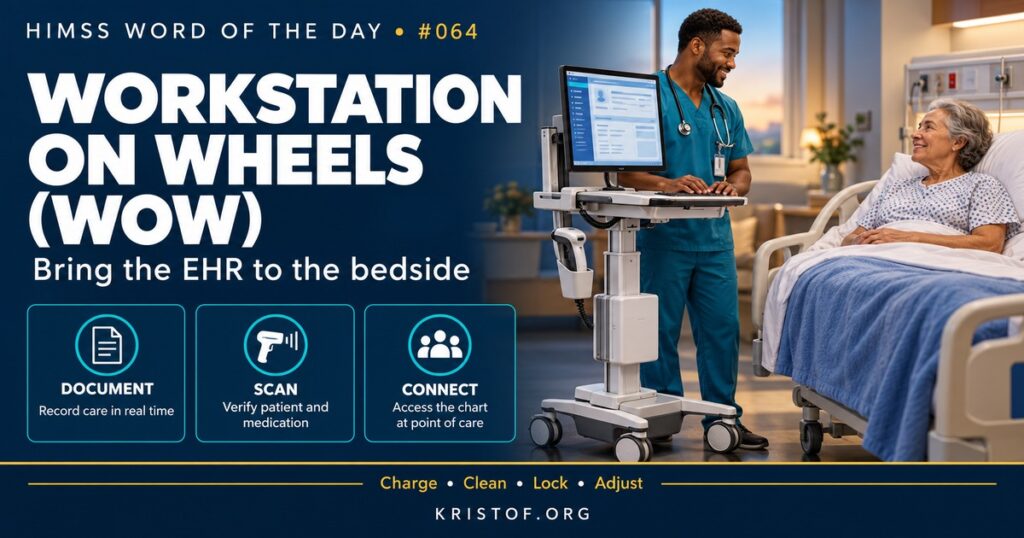
A workstation on wheels (WOW) is a rolling cart with a computer, screen, keyboard, and often a barcode scanner and medication drawers, that clinicians take from room to room. It lets nurses and other clinicians use the EHR at the bedside instead of returning to a fixed desk.
The HIMSS Dictionary describes WOWs as mobile computer stations that move easily between patients and around the hospital, and notes that they are also called mobile workstations. Many clinicians know them by another nickname, the computer on wheels, or COW.
WOWs are one option among several point-of-care devices:
| Device Type | Strengths | Limitations |
|---|---|---|
| Workstation on Wheels | Full screen and keyboard, scanner, storage, moves with the nurse | Bulky, battery dependent, needs cleaning and charging routines |
| Medication Cart with Computer | Combines secure medication storage with documentation | Heavy; may be shared by several nurses |
| Wall-Mounted or Bedside Computer | Always in the room, no battery to manage | Fixed position, may be shared or awkward to reach |
| Handheld Device | Light, always with the nurse, supports scanning and messaging | Small screen, less suited to long documentation |
| Fixed Desktop at the Nurses’ Station | Stable, comfortable for long tasks | Away from the patient, encourages batch documentation |
⚠️ Exam Alert: WOWs are end-user hardware supporting point-of-care documentation. They are not a software application. Questions about device strategy often focus on fit to workflow: a medication pass needs a scanner and mobility, while long documentation may favor a larger fixed screen. The right answer usually involves a mix of device types chosen through workflow analysis.
🌐 Why It Matters: Real-World Healthcare IT Context
Where a nurse documents affects what gets documented. When a computer is at the bedside, nurses can scan the patient’s wristband and medications, record vital signs as they are taken, and review the chart while talking with the patient. When the nearest computer is down the hall, documentation tends to be delayed and batched, which increases the chance of errors and makes the record less timely for the rest of the team.
Barcode medication administration depends on point-of-care hardware. The scan should happen at the bedside, with the patient present, so a scanner and a working computer need to be in the room. Research on BCMA workarounds, including a widely cited 2008 study in JAMIA, has linked unsafe shortcuts to hardware and connectivity problems, such as failing batteries, malfunctioning scanners, and unreliable wireless connections.
WOWs also raise practical infrastructure questions. Wireless coverage must be strong in every room. Batteries must last through a shift or be easy to swap. Carts must be cleaned between patients according to infection prevention policy, using disinfectants that do not damage the equipment. Height-adjustable work surfaces and monitors reduce strain for staff of different heights. Screens must lock automatically, and carts with medication drawers need secure access.
Device planning is part of workflow design. A unit’s mix of WOWs, medication carts, wall-mounted computers, and handheld devices should reflect what nurses actually do there. An intensive care unit with one patient per room may favor in-room computers, while a medical-surgical unit with frequent medication passes may need more mobile carts. Replacement cycles, spare inventory, and a support model for repairs belong in the budget from the start, not as afterthoughts.
Common WOW frustrations:
- Dead or weak batteries in the middle of a medication pass
- Wireless dead zones that drop the EHR session
- Scanners that disconnect or fail to read barcodes
- Too few working carts for the number of nurses on shift
- Carts that are hard to push, clean, or adjust
- Sessions left logged in when a nurse is called away
Characteristics of a successful WOW program:
- Enough working devices for peak staffing, plus spares
- Charging stations and battery swap routines built into unit workflow
- Wireless surveys and coverage testing in every patient room
- Clear cleaning protocols with approved disinfectants
- Fast badge-based login and automatic screen locking
- A simple way to report broken carts and get quick repairs
🏥 The Nurse’s Perspective: Clinical, Bedside, & Workflow
For many inpatient nurses, the WOW is the computer they use most, and its condition shapes the entire shift.
At the Bedside
A medication pass with a working WOW flows smoothly: roll into the room, tap a badge, scan the patient, scan each medication, document, and move on. A WOW with a weak battery, a frozen screen, or a scanner that will not pair interrupts that flow and pushes nurses toward unsafe workarounds, such as scanning outside the room or documenting later.
Positioning matters too. A WOW placed so the nurse faces the patient supports conversation and observation, while one positioned behind the nurse turns attention to the screen. Small choices like this affect the patient’s experience of care.
Ergonomics affects nurses over the long run. Adjusting the cart’s work surface and screen height before a long documentation session, rather than hunching over a fixed height, reduces strain over a twelve-hour shift.
In Clinical Workflow
WOWs are shared equipment, so unit habits matter. Plugging carts in when not in use, wiping them down between rooms, logging out or locking the screen, and reporting problems promptly keep the fleet ready for everyone. Assigning someone to check batteries and supplies at the start of each shift helps avoid surprises in the middle of a medication pass.
Infection prevention is a real concern. Carts move between isolation rooms and other patients, so cleaning protocols and, when needed, dedicated equipment for isolation rooms help prevent transmission.
In EHR Implementation (Go-Live Perspective)
During an Epic Go-Live, hardware readiness is as important as build and training. Teams confirm that each unit has enough WOWs, that scanners are paired and tested, that badge readers work, and that printers and label printers are mapped correctly. Many first-day support calls turn out to be hardware problems rather than software issues.
At-the-elbow support analysts often troubleshoot WOWs directly: reconnecting scanners, restarting frozen sessions, finding a charged cart, or escalating wireless problems. A small supply of spare, fully configured devices on each unit can turn a hardware failure from a delay into a quick swap.
🎓 CAHIMS / CPHIMS & HIMSS Perspective
CAHIMS Exam Domain Mapping
WOWs appear in infrastructure and workflow questions:
| CAHIMS Domain | How WOWs Appear |
|---|---|
| Healthcare & Technology Environments | Point-of-care technology trends; mobile device strategies |
| Clinical Informatics | Bedside documentation, BCMA workflow, ergonomics, infection prevention |
| Healthcare Information & Systems Management | Device management, wireless infrastructure, peripherals, security settings |
| Management & Leadership | Device budgeting, refresh cycles, support models, Go-Live hardware readiness |
Key Terms to Know Alongside WOW
- Point-of-Care Documentation — recording clinical information at the time and place care is delivered
- Computer on Wheels (COW) — a common nickname for a workstation on wheels
- BCMA (Bar Code Medication Administration) — scanning the patient and medication at the bedside before administration
- Mobile Device Management (MDM) — tools for configuring, securing, and updating mobile devices
- Wireless Site Survey — an assessment of wireless signal coverage and capacity across a facility
- Ergonomics — designing equipment and tasks to fit the people who use them
HIMSS Organizational Position
HIMSS addresses point-of-care technology through its focus on usability, nursing informatics, and infrastructure maturity. Its Nursing Informatics Community highlights the role of device and workflow design in safe bedside care. Members can find related education and research through the HIMSS Resource Center.
🔗 Explore Further: External References
- Koppel et al. (2008), JAMIA — Workarounds to Barcode Medication Administration Systems https://pubmed.ncbi.nlm.nih.gov/18436903/
- Poon et al. (2010), New England Journal of Medicine — Effect of Bar-Code Technology on the Safety of Medication Administration https://pubmed.ncbi.nlm.nih.gov/20445181/
- AHRQ PSNet — Human Factors Engineering https://psnet.ahrq.gov/primer/human-factors-engineering
- NIST — Health IT Usability https://www.nist.gov/programs-projects/health-information-technology-usability
- ONC — SAFER Guides https://healthit.gov/clinical-quality-and-safety/safer-guides/
- HIMSS — Nursing Informatics Community https://www.himss.org/networking/communities/nursing-informatics/
Term source: HIMSS Dictionary of Health Information and Technology Terms, Acronyms, and Organizations, 6th Edition (2025). All definitions in this series are paraphrased for editorial purposes. Readers are encouraged to consult the primary source for exact language.
Eric Andrew Kristof, RN, CAHIMS is a Healthcare IT professional and HIMSS Arkansas Chapter member based in Hot Springs Village, AR, with hands-on Epic Go-Live experience and a diverse healthcare and IT background. He writes at kristof.org at the intersection of clinical care and healthcare technology.
Leave a Reply