By Eric Andrew Kristof, RN, CAHIMS | Healthcare IT Professional | HIMSS Arkansas Chapter Member
About This Series: The HIMSS Word of The Day is a running blog series drawing from the HIMSS Dictionary of Health Information and Technology Terms, Acronyms, and Organizations, 6th Edition (2025) — the authoritative reference for healthcare IT professionals and the primary study resource for CAHIMS and CPHIMS certification. Each post paraphrases the term in plain language, grounds it in real-world healthcare IT context, and adds a bedside nursing perspective you won’t find in a textbook.
📖 The Term: Thin Client/Dumb Terminal
Source: HIMSS Dictionary of Health Information and Technology Terms, Acronyms, and Organizations, 6th Edition (2025)
🔍 Plain-Language Definition
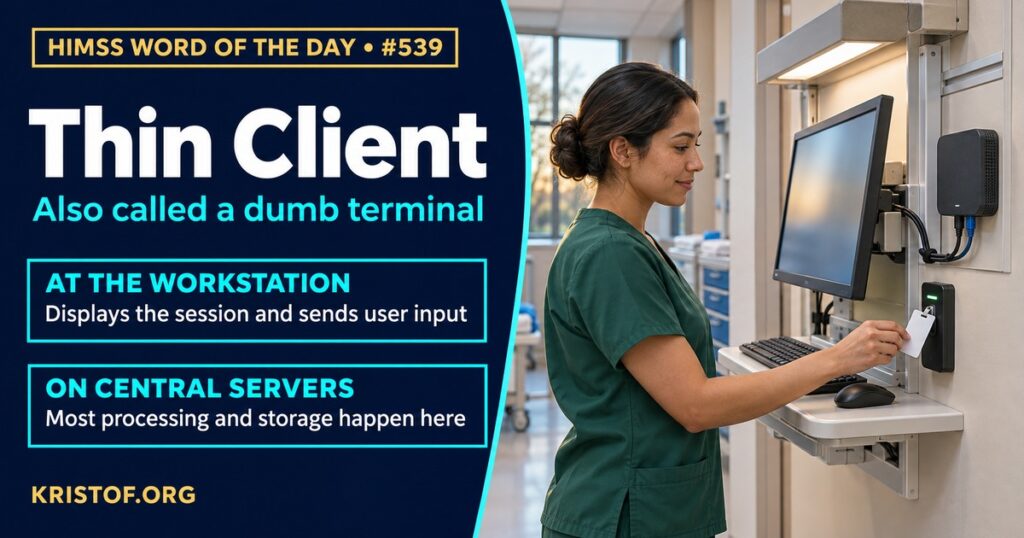
The HIMSS Dictionary describes a thin client, also called a dumb terminal, as a networked computer that keeps few programs on the device and depends heavily on network resources. Its own hardware may be minimal. It might have no extra drives and may not even have its own software applications installed.
The idea is a division of labor. In a traditional desktop setup, each computer runs its own applications and stores its own files. With a thin client, most of the processing and storage live on central servers, and the device mainly shows the screen and passes along the keyboard, mouse, or badge input. A related approach is virtual desktop infrastructure (VDI), in which a user’s desktop runs on a server, and many kinds of devices can reach it, including a thin client, a laptop, or a tablet.
In health care, this approach has appeal. Clinicians move between rooms, units, and sites, and a central desktop can follow them. Updates and security fixes can be applied centrally rather than machine by machine. Data can stay on managed servers instead of on each device. The trade-offs are just as real. The network must be fast and reliable, the servers must be sized to handle peak demand, and a failure in the center can affect many users at once. Because a thin client leans so heavily on those central resources, planning and testing matter as much as the device.
| Element | Thin client approach |
|---|---|
| Device | Light hardware with few local programs |
| Processing | Mostly on central servers |
| Data | Typically held centrally rather than on the device |
| Dependence | Network and server availability |
| Typical benefits | Easier updates, central control, lower hardware cost |
⚠️ Exam Alert: A thin client (or dumb terminal) relies on central servers and the network for most processing, while a thick (fat) client or standard PC runs its own applications. Do not confuse a thin client with a touch screen (an input and display method), a workstation (a general term for a computer and its work area), or virtualization (the technique that often makes thin clients practical).
🌐 Why It Matters: Real-World Healthcare IT Context
Studies of thin-client and virtual-desktop approaches in health care mostly come from implementation reports and operational evaluations. Each source below was checked against its published abstract, and the type of study is noted.
Teramoto and colleagues, in Studies in Health Technology and Informatics (2011), examined how to size the central servers for a thin-client computing implementation of an electronic patient record. They tested server sizing methods with eight scenarios based on practical use of the record. Using data from a hospital that introduced thin-client computing on the basis of these methods, they found that stress testing with one of the sizing methods contributed to steady operation. They also concluded that the scenarios should be improved to reflect more realistic workflow in order to estimate server performance more precisely. It is a technical report from a single hospital.
Yoo and colleagues, in Healthcare Informatics Research (2012), studied the implementation of VDI at Seoul National University Bundang Hospital, a 910-bed tertiary hospital, and used it for physician rounds with an iPad. Implementation issues included highly available system architecture, wireless network infrastructure, and screen resolution, along with privacy and security, mobile device management, and user education. Thirty-five inpatients (including their next of kin) and seven physicians took part in the survey. Patients and next of kin expressed high satisfaction when it was used on rounds. The survey sample was small and from one hospital, and satisfaction does not measure clinical outcomes.
Meyer and colleagues, in eGEMs (2016), discussed their experience deploying a Secure Data Analysis Platform and offered a framework for planning, building, and deploying VDI to support innovation and collaboration within academic funding structures. The framework names six core components: security, ease of access, performance, cost, tools, and training. The authors say success depends on a collaborative environment where users and researchers plan and evaluate requirements, not on technical excellence alone. It is a framework drawn from one project.
Gellert and colleagues, in the International Journal of Medical Informatics (2017), evaluated workstation single sign-on (SSO) at CHRISTUS Health, in which clinicians tap an identification badge at a reader instead of typing credentials. They sampled 65,202 logins over seven days among 2,256 active clinical users in six facilities and compared them with logins before implementation. The net gain was 168.3 hours of clinician time per week across the six facilities, or 28.1 hours per facility. The authors also assigned dollar values to time saved, reported about $92,146 per hospital per year, and added savings from moving to a thin client that replaced traditional workstations, which raised the first-phase total for 18 hospitals to $2,333,745 a year. The dollar figures are the authors’ estimates based on assigned values for clinician time.
Gellert and colleagues, in Perspectives in Health Information Management (2019), evaluated SSO in 19 community hospitals of a large health system. They measured 128 logins across eight randomly selected hospitals. First-of-shift login time fell by 5.3 seconds (15.3 percent), and reconnect login time during the rest of the shift fell by 20.4 seconds (69.9 percent). They estimated about 943.4 hours of clinician time per week liberated across the 19 hospitals, with a value of $3,201,001 per year, and about $3,330,601 per year when desktop virtualization and thin client devices, in lieu of more costly desktop computers, were included. The time measurement sample was small, and the dollar values are estimates.
Zai and colleagues, in JAMIA Open (2024), reported a case study of virtual desktops for clinical research at UMass Chan Medical School. The process involved forming a Research Informatics Steering Executive workgroup, identifying requirements, implementing Amazon WorkSpaces, and setting up configurable data management for research support. The lessons the authors name include collaboration, a balance between user-friendliness and functionality, flexibility in data management, efficiency within budget, and continuous user feedback. It is a case report and does not provide measured outcomes.
Taken together, the sources show that thin-client and virtual-desktop approaches can fit the way clinicians move, can reduce login time when paired with badge sign-on, and can lower hardware costs, but that they depend on careful server sizing, network design, security, and user education.
Common thin client problems:
- Servers that are undersized for peak demand
- Network or wireless problems that affect every connected user
- Screen resolution and display limits on small or mobile devices
- Privacy and security gaps when devices are mobile
- Lack of user training on a new way of working
- Single points of failure in the central system
What supports effective thin client use:
- Stress testing based on realistic clinical scenarios
- Highly available server and network design
- Badge tap sign-on and fast session reconnect
- Mobile device management and clear security policies
- Training and feedback from the people who use the devices
- Planning that weighs time saved, hardware cost, and support burden
🏥 The Nurse’s Perspective: Clinical, Bedside, & Workflow
Nurses use shared workstations constantly, so the speed of logging in and the reliability of the session are felt at every task.
At the Bedside
A nurse moving between rooms may need to log in many times a shift. The sign-on studies measured how much time a badge tap saves and how a reconnect to an existing session compares with typing credentials each time. The saved seconds add up across a shift, and fewer interruptions can help keep attention on the patient. When the network or a central server slows down, every thin-client workstation feels it at once.
In Clinical Workflow
Nurse informaticists and IT staff plan device placement, session settings, and downtime procedures. Because the thin client depends on central systems, downtime plans matter: staff need to know what to do if the network or server is unavailable, including paper backups and how to restore sessions afterward.
In EHR Implementation (Go-Live Perspective)
During an Epic Go-Live, analysts at the elbow watch for slow logins, lost sessions, and screens that look different on carts, desktops, and tablets. These reports help separate application issues from network or server capacity issues, and they tell the infrastructure team where to look first.
🎓 CAHIMS / CPHIMS & HIMSS Perspective
CAHIMS Exam Domain Mapping
Thin clients connect infrastructure, security, and workflow:
| CAHIMS Domain | How Thin Clients Appear |
|---|---|
| Healthcare & Technology Environments | Hospital networks, mobile devices, and cloud-based services |
| Clinical Informatics | Clinician workflow, login time, and session continuity |
| Healthcare Information & Systems Management | Server sizing, VDI, device management, and downtime planning |
| Management & Leadership | Cost, hardware lifecycle, vendor selection, and user training |
Key Terms to Know Alongside Thin Client
- Virtual Desktop Infrastructure (VDI) — approach in which a user’s desktop runs on a server and is delivered to a device
- Single Sign-On (SSO) — one authentication that gives access to multiple applications
- Thick Client — computer that runs its own applications and stores data locally
- Workstation — computer and surrounding area set up for a defined set of tasks
- Server Sizing — estimating the server capacity needed for expected demand
- Downtime Procedure — planned steps to continue work when a system is unavailable
HIMSS Organizational Position
HIMSS offers education and research on health information and technology topics through its Resource Center. Members can find related information on the HIMSS Resource Center page.
🧭 More HIMSS Word of The Day Terms
Related terms in the IT Infrastructure series:
Browse all IT Infrastructure terms or the A–Z glossary.
🔗 Explore Further: External References
- Teramoto et al. (2011), Studies in health technology and informatics — Scenario-based stress testing of an electronic patient record system in a thin-client computing implementation https://pubmed.ncbi.nlm.nih.gov/21335700/
- Yoo et al. (2012), Healthcare informatics research — Implementation Issues of Virtual Desktop Infrastructure and Its Case Study for a Physician’s Round at Seoul National University Bundang Hospital https://pubmed.ncbi.nlm.nih.gov/23346476/
- Meyer et al. (2016), EGEMS (Washington, DC) — Framework for Deploying a Virtualized Computing Environment for Collaborative and Secure Data Analytics https://pubmed.ncbi.nlm.nih.gov/27683665/
- Gellert et al. (2017), International journal of medical informatics — Clinical impact and value of workstation single sign-on https://pubmed.ncbi.nlm.nih.gov/28347442/
- Gellert et al. (2019), Perspectives in health information management — An Evaluation of the Clinical and Financial Value of Work Station Single Sign-on in 19 Hospitals https://pubmed.ncbi.nlm.nih.gov/31423117/
- Zai et al. (2024), JAMIA open — Implementing virtual desktops for clinical research at an academic health center: a case report https://pubmed.ncbi.nlm.nih.gov/39206281/
- HIMSS — Resource Center https://www.himss.org/resource-center
Term source: HIMSS Dictionary of Health Information and Technology Terms, Acronyms, and Organizations, 6th Edition (2025). All definitions in this series are paraphrased for editorial purposes. Readers are encouraged to consult the primary source for exact language.
Eric Andrew Kristof, RN, CAHIMS is a Healthcare IT professional and HIMSS Arkansas Chapter member based in Hot Springs Village, AR, with hands-on Epic Go-Live experience and a diverse healthcare and IT background. He writes at kristof.org at the intersection of clinical care and healthcare technology.
Leave a Reply