By Eric Andrew Kristof, RN, CAHIMS | Healthcare IT Professional | HIMSS Arkansas Chapter Member
About This Series: The HIMSS Word of The Day is a running blog series drawing from the HIMSS Dictionary of Health Information and Technology Terms, Acronyms, and Organizations, 6th Edition (2025) — the authoritative reference for healthcare IT professionals and the primary study resource for CAHIMS and CPHIMS certification. Each post paraphrases the term in plain language, grounds it in real-world healthcare IT context, and adds a bedside nursing perspective you won’t find in a textbook.
📖 The Term: Workstation
Source: HIMSS Dictionary of Health Information and Technology Terms, Acronyms, and Organizations, 6th Edition (2025)
🔍 Plain-Language Definition
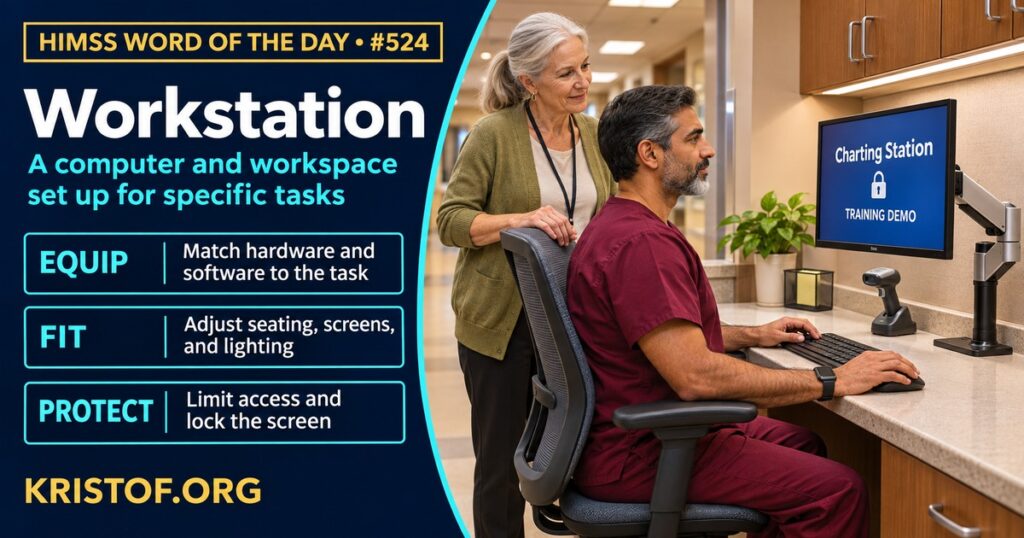
The HIMSS Dictionary describes a workstation as a computer, and often the area around it, that has been configured for a defined group of jobs, for example entering orders, writing notes, capturing audio, or producing video. The description goes on to say that workstations generally have a large, high-resolution screen and a lot of memory, reach shared network resources, and run applications locally. Most have a built-in storage drive, while a special kind called a diskless workstation does not. The operating systems the dictionary names, Unix and Windows NT, reflect an earlier period of computing, but the core idea still holds: a workstation is a purpose-built point of access.
In health care, the word covers more than hardware. A nurse station with a desk, chair, monitor, scanner, and printer is a workstation. So is a radiologist’s reading station with calibrated displays, a dictation microphone, and image viewing software. So are a pharmacy verification station, a registration desk, and a remote worker’s home setup. Because the setup is tied to tasks, it matters how well the screen, input devices, seating, lighting, and software fit the work.
Regulation uses a related meaning. The HIPAA Security Rule defines a workstation as an electronic computing device, such as a laptop or desktop computer, or any other device that performs similar functions, together with the electronic media stored in its immediate environment. Under its physical safeguards in 45 CFR 164.310, covered entities must address both workstation use (the proper functions and surroundings of a workstation that can access electronic protected health information) and workstation security (physical safeguards that restrict access to authorized users).
Two themes follow: people need workstations that fit their bodies and tasks, and organizations need them to be safe places to handle patient data.
| Aspect | What it covers |
|---|---|
| Hardware | Computer, displays, input devices, storage, and peripherals |
| Software | Local applications, network access, and sign-on |
| Space | Desk, chair, lighting, noise, layout, and privacy |
| Task fit | Orders, notes, image reading, dictation, or verification |
| Security | Access limits, screen privacy, auto-lock, and physical protection |
⚠️ Exam Alert: A workstation is a computer set up for defined tasks, along with its surrounding area. Do not confuse it with a server (which provides services to many users), a thin client (which relies on a central system for processing), or a workstation on wheels (WOW), which is a mobile cart-based version. Under HIPAA, workstation use and workstation security are physical safeguard standards.
🌐 Why It Matters: Real-World Healthcare IT Context
Studies of workstations in health care focus on ergonomics, productivity, and remote set-up. Each source below was checked against its published abstract.
Mokarami and colleagues, in BMC Nursing (2021), developed and validated the Nurse Station Ergonomics Assessment (NSEA) tool. In mixed-methods research involving 133 nurse stations in ten hospitals, they built the tool from a literature review, an expert panel, and nurse interviews. The final tool has 64 items across eight domains: layout and location, workspace, security-safety, environmental conditions, counter, chair, desk, and monitor. Validity was assessed by face and content validity, and reliability by inter-rater agreement and a four-week test-retest. The authors describe it as useful for managers to check compliance and to target improvements. The tool was developed in the hospitals studied, so its fit elsewhere has to be confirmed.
Alelyani and colleagues, in BMC Musculoskeletal Disorders (2023), surveyed 814 radiologists in Saudi Arabia online about work-related musculoskeletal symptoms over the prior 12 months. Prevalence was 87.7 percent. Neck pain (59.3 percent) and lower back pain (57.1 percent) were the most common symptoms. Age, years of experience, part-time employment, gender, and imaging modality were associated with symptoms. It is a self-reported, cross-sectional survey, so it shows association, not cause, and it does not isolate the workstation from other factors.
McGrath and colleagues, in the European Journal of Radiology (2022), reviewed ways to improve radiologist productivity and efficiency. They describe institutional needs such as universal log-in systems and dashboards, and workstation optimizations such as hanging protocols, customized keyboard shortcuts, hotkeys, and advanced scripts. They add that reading room layouts should limit interruptions and that workstations must consider ergonomics to prevent fatigue and strain. It is a narrative review of strategies rather than a test of one approach.
Alhasan and Alhasan, in Insights into Imaging (2025), reviewed technical requirements for home-based teleradiology workstations. They report that, according to available data, 65 percent of institutions established home workstations during the pandemic and 74 percent moved routine daytime shifts to internal teleradiology. They summarize specifications on display luminance, ambient lighting of 25 to 75 lux, acoustic levels below 40 decibels, temperature of 20 to 24 degrees Celsius, and sustained bandwidth of at least 50 to 100 Mbps, and note that evidence suggests properly configured remote workstations maintain diagnostic performance. They also identify gaps in technical standardization, regulatory harmonization, and long-term outcomes. It is a review that draws on other studies and expert recommendations, so the figures describe the literature it gathered.
Taken together, the studies show that a workstation is a system of equipment, space, and software, that poor fit is linked with discomfort and strain, and that remote and shared setups add technical and security questions.
Common workstation problems:
- Layouts, chairs, and monitor heights that do not fit the user or the task
- Slow or repeated log-ins that interrupt work
- Screens visible to visitors or passers-by
- Shared or poorly maintained peripherals
- Remote setups with inadequate displays, lighting, or network capacity
- Security lapses such as unlocked sessions or unattended devices
What supports effective workstations:
- Ergonomic assessment of layouts and equipment
- Adjustable furniture and well-positioned monitors
- Software optimizations such as shortcuts, saved layouts, and fast sign-on
- Privacy filters, auto-lock, and clear workstation use policies
- Defined technical standards for remote workstations
- Feedback from the staff who use them daily
🏥 The Nurse’s Perspective: Clinical, Bedside, & Workflow
The workstation is where much of a nurse’s documentation, order review, and communication takes place, and its design affects comfort and focus.
At the Bedside
Nurses use fixed desktops at stations, mobile carts, and wall-mounted or bedside screens. Quick log-in, a clear view of the screen, and a comfortable position make documentation faster and less tiring. Awkward setups can lead to workarounds such as delayed charting or sharing a log-in.
In Clinical Workflow
Nurse informaticists and managers help decide where workstations are placed, what peripherals they include, and how they protect privacy. Screen position, sight lines to patient rooms, and proximity to supplies all matter. Reporting problems such as glare, poorly placed monitors, or frequent log-in failures turns daily annoyances into issues that can be fixed.
In EHR Implementation (Go-Live Perspective)
During an Epic Go-Live, workstation readiness is one of the first things tested. Analysts at the elbow check that badge readers, printers, scanners, and displays work at each station, and they see where the layout slows the work. Problems with a single workstation are quick to spot at go-live and are far easier to correct when units are still staffed with extra support.
🎓 CAHIMS / CPHIMS & HIMSS Perspective
CAHIMS Exam Domain Mapping
The workstation touches infrastructure, safety, and compliance:
| CAHIMS Domain | How Workstation Appears |
|---|---|
| Healthcare & Technology Environments | End-user devices, regulation, and facility design |
| Clinical Informatics | Workflow fit, usability, and task-specific set-up |
| Healthcare Information & Systems Management | Deployment, support, HIPAA workstation use and security |
| Management & Leadership | Ergonomics programs, budgets, and replacement planning |
Key Terms to Know Alongside Workstation
- Workstation on Wheels (WOW) — mobile cart that carries a computer to the point of care
- Thin Client — terminal that relies on a central system for most processing
- Physical Safeguards — measures that protect information systems and equipment from hazards and intrusion
- Ergonomics — fitting equipment and tasks to the people who use them
- Single Sign-On — one log-in that grants access to multiple applications
- Hanging Protocol — saved arrangement for displaying images in a reading workflow
HIMSS Organizational Position
HIMSS offers education and research on health information and technology topics through its Resource Center. Members can find related information on the HIMSS Resource Center page.
🧭 More HIMSS Word of The Day Terms
Related terms in the IT Infrastructure series:
Browse all IT Infrastructure terms or the A–Z glossary.
🔗 Explore Further: External References
- Mokarami et al. (2021), BMC nursing — Development and validation of a Nurse Station Ergonomics Assessment (NSEA) tool https://pubmed.ncbi.nlm.nih.gov/34059027/
- Alelyani et al. (2023), BMC musculoskeletal disorders — Work-related musculoskeletal symptoms among Saudi radiologists: a cross-sectional multi-centre study https://pubmed.ncbi.nlm.nih.gov/37286979/
- McGrath et al. (2022), European journal of radiology — Optimizing radiologist productivity and efficiency: Work smarter, not harder https://pubmed.ncbi.nlm.nih.gov/35031167/
- Alhasan and Alhasan (2025), Insights into imaging — Technical requirements and optimization strategies for home-based teleradiology workstations: a review article https://pubmed.ncbi.nlm.nih.gov/40965740/
- Cornell LII — 45 CFR 164.304, Definitions (HIPAA Security Rule) https://www.law.cornell.edu/cfr/text/45/164.304
- eCFR — 45 CFR 164.310, Physical Safeguards https://www.ecfr.gov/current/title-45/subtitle-A/subchapter-C/part-164/subpart-C/section-164.310
- HIMSS — Resource Center https://www.himss.org/resource-center
Term source: HIMSS Dictionary of Health Information and Technology Terms, Acronyms, and Organizations, 6th Edition (2025). All definitions in this series are paraphrased for editorial purposes. Readers are encouraged to consult the primary source for exact language.
Eric Andrew Kristof, RN, CAHIMS is a Healthcare IT professional and HIMSS Arkansas Chapter member based in Hot Springs Village, AR, with hands-on Epic Go-Live experience and a diverse healthcare and IT background. He writes at kristof.org at the intersection of clinical care and healthcare technology.
Leave a Reply